
Model Context Protocol (MCP) Explained
Model Context Protocol (MCP) Explained guidance for engineers: compare architecture choices, avoid failure modes, and ship a measurable, reliable.

Muhammad Abdul Sami
· Updated · 13 min read
- AI Agents
- Tool Calling
- LangGraph
- Architecture
Building production AI systems that connect to real-world data has been one of the hardest challenges in modern software development. When you ask an LLM "What's my latest sales forecast?" or "Query our customer database," the model can't access your systems — its knowledge is frozen at training time, isolated from your databases, APIs, and real-time data sources.
Key Takeaways:
- Treat Model Context Protocol (MCP) Explained as a system with an explicit input and output contract.
- Benchmark a representative baseline before choosing an optimization.
- Bound retries, queues, concurrency, and total request deadlines.
- Roll out through offline replay, shadow traffic, and a measurable canary.
- Keep rollback simple and attach version identifiers to every decision.
The Model Context Protocol (MCP) solves this AI integration challenge. After implementing MCP in production AI agent systems, I can confirm this protocol is transforming how we build intelligent applications. This tutorial will show you exactly how to use MCP with working Python code.
Table of Contents
- Why MCP Matters
- MCP Architecture Overview
- Building Your First MCP Server
- MCP Tools: Enabling Actions
- MCP Resources: Data Access
- MCP vs RAG
- Production Best Practices
- Getting Started
Why MCP Matters: Solving AI Data Access
When building production AI systems, we face a critical challenge: LLMs can't access real-time data. Six months ago, while implementing an AI assistant for customer database queries, I tried the naive approach of embedding database schemas in prompts. It broke immediately when schemas changed.
This is the AI integration problem every engineering team faces. Language models have two fundamental limitations:
The Core Problems
- Static training data: LLM knowledge has a cutoff date — no access to real-time information, current databases, or live APIs
- System isolation: Models can't natively call external tools, execute API requests, or interact with your infrastructure
The Integration Nightmare
The traditional solution creates an N×M nightmare: N AI models × M data sources = dozens of custom connectors.
Each integration (Snowflake, PostgreSQL, Notion, Salesforce) requires:
- Separate custom implementation
- Independent authentication handling
- Version management overhead
- Maintenance for every model + data source combination
MCP: The Universal Solution
Model Context Protocol changes everything. MCP provides a universal, standardized protocol for AI-to-data integration, similar to how REST APIs standardized web service communication.
Think of MCP as the USB-C for AI applications — one protocol to connect any LLM with any data source, tool, or external system.
For teams building AI agents or RAG systems, MCP eliminates integration fragmentation and enables true production-grade AI deployments.
MCP Architecture: How AI Tool Calling Works
The Model Context Protocol uses a client-server architecture optimized for LLM integration. Understanding this architecture is critical for building production AI systems.

The Three Core Components
1. MCP Host (AI Application Layer)
The MCP host is your AI application — Claude Desktop, ChatGPT, custom AI agent applications, or any LLM-powered software.
Host responsibilities:
- Coordinates multiple MCP clients
- Orchestrates context flow between model and data sources
- Manages conversation state and tool invocations
- Routes requests to appropriate MCP clients
2. MCP Client (Connection Layer)
Each MCP client maintains a dedicated 1:1 connection to one MCP server, fetching real-time context and enabling the AI model to access external systems.
Client responsibilities:
- Connection management and keepalive
- Authentication and credential handling
- Request routing and response parsing
- Data transformation and validation
3. MCP Server (Data & Tool Provider)
An MCP server exposes tools, resources, and data to AI models through the standardized protocol.
Server deployment options:
- Local: Filesystem access, local databases, development tools
- Remote: Cloud APIs, enterprise systems, third-party services
This architecture pattern mirrors proven API design principles — clear separation of concerns, standard protocols, and maintainable interfaces.
How It Works: End-to-End Flow
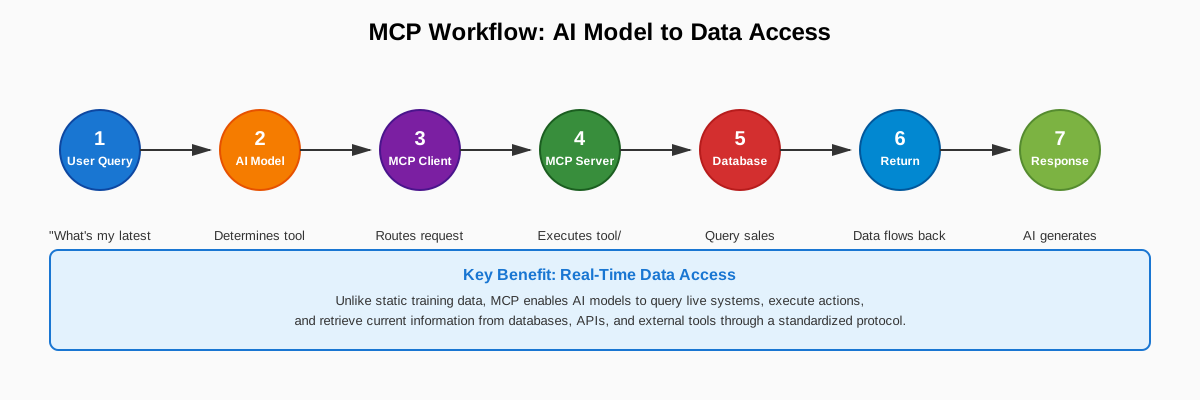
The workflow follows these steps:
- User submits query to AI application
- AI model determines which tool/data is needed
- MCP client routes request via protocol
- MCP server executes tool or fetches resource
- External system (database, API) returns data
- Data flows back through MCP chain
- AI generates response with current information
Building Your First MCP Server
Let's build a production-ready MCP server using Python. This hands-on tutorial shows you exactly how to implement the Model Context Protocol for real AI applications.
Install MCP Python SDK
Set up your MCP development environment:
uv init mcp-demo
cd mcp-demo
uv add "mcp[cli]"
The mcp package includes everything you need:
- Server framework
- Client tools
- CLI utilities
- MCP Inspector for interactive testing
Complete MCP Server Example
Here's a minimal working MCP server — production-ready code in 15 lines:
from mcp.server import MCPServer

mcp = MCPServer("Demo")

@mcp.tool()
def add(a: int, b: int) -> int:
    """Add two numbers."""
    return a + b

@mcp.resource("greeting://{name}")
def greeting(name: str) -> str:
    """Greet someone by name."""
    return f"Hello, {name}!"
Run and Test Your Server
Start the MCP Inspector for interactive testing:
uv run mcp dev server.py
This launches a web interface where you can:
- Test tools interactively
- Browse available resources
- Inspect request/response payloads
- Debug authentication and errors
MCP Tools: Enabling LLM Tool Calling & Actions
MCP tools are the breakthrough feature for AI integration. Tools enable LLM tool calling — giving language models the ability to execute real actions through your server.
What Tools Enable
MCP tools allow AI models to:
- Execute database queries
- Call external APIs
- Perform file operations
- Trigger workflows
- Integrate with third-party services
Unlike passive resources (data retrieval only), MCP tools are action-oriented functions with side effects. This is how you build production AI agents that actually do things rather than just generating text.
Real-World Example: E-commerce Server
Here's a complete MCP server with practical business tools:
from mcp.server.fastmcp import FastMCP

mcp = FastMCP("ecommerce")

@mcp.tool()
async def get_customer_info(customer_id: str) -> str:
    """Search for a customer using their unique identifier."""
    customers = {
        "C001": {"name": "Alice", "plan": "Pro"},
        "C002": {"name": "Bob", "plan": "Enterprise"},
    }
    info = customers.get(customer_id)
    if not info:
        return "Customer not found"
    return f"Customer: {info['name']}, Plan: {info['plan']}"

@mcp.tool()
async def check_inventory(product_name: str) -> str:
    """Search inventory for a product by product name."""
    inventory = {
        "widget": {"name": "Widget Pro", "stock": 150, "sku": "W001"},
        "gadget": {"name": "Smart Gadget", "stock": 37, "sku": "G042"},
    }
    matches = []
    for sku, product in inventory.items():
        if product_name.lower() in product["name"].lower():
            matches.append(
                f"{product['name']} (SKU: {sku}) — Stock: {product['stock']}"
            )
    return "\n".join(matches) if matches else "No matching products found."

@mcp.tool()
async def create_order(customer_id: str, product_sku: str, quantity: int) -> str:
    """Create a new order for a customer."""
    # In production: validate inventory, process payment, create order record
    return f"Order created: {quantity}x {product_sku} for customer {customer_id}"
Tool Design Best Practices
- Clear docstrings: The docstring becomes the tool description the AI sees
- Type hints: Use Python type hints for automatic validation
- Error handling: Return clear error messages, don't raise exceptions
- Idempotency: Design tools to be safely retried
- Audit logging: Log all tool invocations for security and debugging
MCP Resources: Exposing Live Data to Language Models
MCP resources provide real-time data access for LLMs. Think of resources as GET endpoints in a REST API — they expose data to AI models without performing heavy computation or causing side effects.
When to Use Resources
Resources are critical for:
- RAG systems that need document access
- Configuration and settings retrieval
- Real-time metrics and status information
- Database query results (read-only)
- File system access
Unlike static training data, MCP resources deliver current, dynamic information directly to the model.
Resource Implementation Example
from mcp.server.fastmcp import FastMCP

mcp = FastMCP("demo-resources")

@mcp.resource("file://documents/{name}")
def read_document(name: str) -> str:
    """Read a document by name."""
    # In production, this would read from disk or a database
    documents = {
        "terms": "Our terms of service state that users must...",
        "privacy": "Our privacy policy covers data collection, storage...",
        "faq": "Frequently asked questions: 1. How do I...?",
    }
    return documents.get(name, f"Document '{name}' not found")

@mcp.resource("config://settings")
def get_settings() -> str:
    """Get application settings."""
    return '{"theme": "dark", "language": "en", "debug": false}'

@mcp.resource("metrics://system")
def get_system_metrics() -> str:
    """Get current system metrics."""
    # In production: query monitoring system
    return '{"cpu": 45.2, "memory": 67.8, "requests_per_sec": 1250}'
Resource URI Patterns
Resources use URI templates for organization:
file://documents/{name}— File system pathsconfig://settings— Configuration valuesdb://users/{id}— Database recordsapi://external/{endpoint}— External API wrappers
MCP Prompts: Reusable AI Interaction Templates
MCP prompts are reusable templates that standardize how LLMs interact with your server.
Prompt Use Cases
Prompts are especially valuable for:
- System prompts: Define AI behavior and constraints
- Few-shot examples: Guide model responses with examples
- Interaction patterns: Standardize common workflows (code review, debugging, data analysis)
For production AI systems, prompts ensure consistent model behavior and reduce prompt engineering overhead.
Prompt Implementation Example
from mcp.server.fastmcp import FastMCP

mcp = FastMCP("prompt-demo")

@mcp.prompt(title="Code Review")
def review_code(code: str) -> str:
    """Generate a code review request."""
    return f"""Please review this code:

{code}

Key areas to focus on:
1. Security vulnerabilities
2. Performance optimizations
3. Code readability
4. Test coverage
5. Error handling
"""

@mcp.prompt(title="Debug Assistant")
def debug_error(error: str) -> list:
    """Structure a debug assistance prompt."""
    return [
        {
            "role": "user",
            "content": f"I'm seeing this error:\n{error}\n\nCan you help me debug it?"
        },
        {
            "role": "assistant",
            "content": "I'll help debug that. What have you tried so far? Also, can you share the relevant code and any logs?"
        },
    ]

@mcp.prompt(title="Data Analysis")
def analyze_data(dataset_name: str) -> str:
    """Generate a data analysis prompt."""
    return f"""Analyze the {dataset_name} dataset. Please provide:

1. Summary statistics (mean, median, mode, std dev)
2. Data quality issues (nulls, outliers, duplicates)
3. Key insights and patterns
4. Recommendations for data cleaning
5. Suggested visualizations

Format the output as a structured report."""
MCP Transport Options: Local vs Remote Deployment
The Model Context Protocol supports multiple transport layers depending on your deployment architecture.
Transport Options
STDIO (Standard Input/Output)
Best for:
- Local development and testing
- Claude Desktop integration
- Single-machine deployments
- Simple, secure, fast
# STDIO transport (default for local development)
mcp.run(transport="stdio")
How it works: The MCP server reads from stdin and writes to stdout — the simplest possible transport mechanism.
Streamable HTTP (SSE-based)
Best for:
- Production deployments
- Cloud infrastructure
- Distributed AI systems
- Remote server access
# HTTP transport for production
mcp.run(transport="streamable-http", host="0.0.0.0", port=8000)
How it works: Uses Server-Sent Events (SSE) for full-duplex communication with built-in connection management, authentication, and load balancing support.
SSE (Server-Sent Events)
Best for:
- Read-heavy applications
- Monitoring dashboards
- Real-time data feeds
- Simpler unidirectional flows
MCP vs RAG: Understanding the Difference
Engineers often ask: "How does MCP differ from RAG (Retrieval-Augmented Generation)?"
They're complementary technologies that solve different problems in AI system architecture.
RAG: Information Retrieval for Context
RAG systems retrieve relevant documents from vector databases or search indexes, then inject that information into LLM prompts for text generation.
Focus: Knowledge retrieval — finding and providing context to improve model responses.
RAG workflow:
User query
  → Vector search
  → Retrieve documents
  → Inject into prompt
  → Generate response
What RAG does:
- Semantic search across document collections
- Chunk retrieval from vector databases
- Context injection for prompt augmentation
- Document-based question answering
MCP: Standardized AI Integration Protocol
Model Context Protocol is a broader integration framework. MCP defines a standardized protocol enabling LLMs to:
- Call external tools and functions (API requests, database queries)
- Access real-time data sources (not just static document stores)
- Perform actions with side effects (create records, trigger workflows, modify systems)
- Connect to any data source through a universal interface
MCP workflow:
AI model
  ↔ MCP client
  ↔ MCP server
  ↔ Any external system
What MCP enables:
- Tool calling and function execution
- Real-time database queries
- API integrations
- File system operations
- External service orchestration
- Action triggers with side effects
The Relationship: RAG as an MCP Use Case
Think of RAG as one specific use case within the MCP ecosystem.
You can implement a RAG system using MCP by building an MCP server that exposes document retrieval as a tool. But MCP enables far more than just retrieval — it's the universal connector for all AI-to-system integrations.
Production Architecture Recommendation
When building production AI applications, combine both:
- Use MCP as your integration layer — standardized protocol for all external connections
- Use RAG as your knowledge retrieval strategy — semantic search and document retrieval
This is the architecture we recommend for enterprise AI systems.
MCP Implementation Best Practices for Production
Building production-grade MCP servers requires more than working code. Here are proven best practices from deploying Model Context Protocol in real AI systems:
1. Start Simple, Scale Gradually
Begin with a single MCP tool and one transport layer (STDIO for local, HTTP for remote).
Don't architect for complexity you don't have yet. Add features as your AI application's requirements become clear.
Example progression:
- Week 1: One tool, STDIO transport, manual testing
- Week 2: Add 2-3 more tools, structured error handling
- Week 3: Switch to HTTP transport, add authentication
- Week 4: Production deployment with monitoring
2. Error Handling is Critical
AI models will send unexpected inputs. Validate everything:
@mcp.tool()
async def get_user(user_id: str) -> str:
    """Get user information by ID."""
    # Input validation
    if not user_id or not user_id.isalnum():
        return "Error: Invalid user ID format"

    if len(user_id) > 100:
        return "Error: User ID too long"

    try:
        # Database query here
        user = await db.get_user(user_id)
        if not user:
            return "Error: User not found"
        return f"User: {user.name}, Email: {user.email}"
    except Exception as e:
        # Log error, don't expose internals
        logger.error(f"Database error: {e}")
        return "Error: Unable to retrieve user"
Your MCP server is an API endpoint — treat it with the same rigor.
3. Version Your Protocol
MCP protocol versions matter. When implementing server/discover, explicitly declare your protocol version:
@mcp.list_tools()
async def list_tools():
    return {
        "tools": [...],
        "protocol_version": "2024-11-05"
    }
This prevents breaking changes from affecting downstream AI applications.
4. Security & Authentication First
Design authentication before production deployment:
OAuth 2.0
- Best for: Multi-tenant AI applications
- Use when: You need user-specific permissions and token refresh
API Keys
- Best for: Internal tools and trusted environments
- Use when: Simple, effective authentication without user flows
JWT Tokens
- Best for: Distributed systems and microservices
- Use when: You need stateless authentication with claims
Never expose production data through unauthenticated MCP servers.
Implement from day one:
- Request signing
- Rate limiting
- Access controls
- Audit logging
5. Use the MCP Inspector for Testing
The MCP Inspector is essential for debugging.
Test interactively before integrating with your AI application:
uv run mcp dev server.py
The Inspector shows you:
- Available tools, resources, and prompts
- Exact request/response payloads
- Type validation errors
- Authentication flow
- Real-time tool execution
6. Monitor & Observe Everything
Instrument your MCP servers with logging, metrics, and tracing.
Track these metrics:
- Tool invocation frequency and latency
- Error rates by tool/resource
- Authentication failures and rate limit hits
- Data volume transferred
- Concurrent connection count
- External API latency (if calling downstream services)
Use observability best practices — your MCP server is production infrastructure.
Example monitoring code:
import time
from prometheus_client import Counter, Histogram

tool_calls = Counter('mcp_tool_calls_total', 'Total tool calls', ['tool_name', 'status'])
tool_duration = Histogram('mcp_tool_duration_seconds', 'Tool execution time', ['tool_name'])

@mcp.tool()
async def monitored_tool(param: str) -> str:
    """Tool with instrumentation."""
    start = time.time()
    try:
        result = await do_work(param)
        tool_calls.labels(tool_name='monitored_tool', status='success').inc()
        return result
    except Exception as e:
        tool_calls.labels(tool_name='monitored_tool', status='error').inc()
        raise
    finally:
        duration = time.time() - start
        tool_duration.labels(tool_name='monitored_tool').observe(duration)
Getting Started with Model Context Protocol
The Model Context Protocol is rapidly becoming essential infrastructure for production AI systems. Both Claude (Anthropic) and ChatGPT (OpenAI) support MCP, with growing ecosystem adoption across AI platforms.
Next Steps for Implementation
1. Read the Official Specification
MCP Documentation covers:
- Protocol details and message format
- Transport options and security
- Authentication patterns
- Best practices and examples
2. Install the Python SDK
MCP Python SDK on GitHub — the fastest path to working code.
3. Build a Simple Server
Start with 2-3 tools exposing real data from your systems:
from mcp.server.fastmcp import FastMCP

mcp = FastMCP("my-first-server")

@mcp.tool()
def search_docs(query: str) -> str:
    """Search internal documentation."""
    # Your implementation here
    pass

@mcp.resource("config://app")
def get_config() -> str:
    """Get app configuration."""
    # Your implementation here
    pass
4. Test with the MCP Inspector
Debug your implementation interactively before production:
uv run mcp dev server.py
5. Deploy with Proper Auth
Never skip security — implement authentication, rate limiting, and access controls from day one.
When to Use MCP in Your AI Stack
Use Model Context Protocol when:
- Building AI agents that need to call APIs or query databases
- Implementing RAG systems with real-time data retrieval
- Creating AI assistants that interact with internal tools and services
- Standardizing LLM integration across multiple data sources
- Enabling tool calling and function execution for AI models
Skip MCP if:
- Your AI application only needs static knowledge (no external data)
- You're prototyping with hardcoded demo data
- Integration complexity doesn't justify the protocol overhead
- Simple prompt engineering solves your use case
Need Help Building Production AI Systems?
At HinterBuild, we build production-grade AI infrastructure — agents, RAG systems, and MCP integrations that scale.
If you're implementing Model Context Protocol for enterprise AI applications and need technical guidance, let's talk.
Our AI Engineering Services
We specialize in:
-
AI agent development with MCP integration
- Multi-agent systems and tool orchestration
- Production-grade agent frameworks
- Custom tool development and testing
-
RAG & LLM systems with real-time data access
- Vector databases and semantic search
- Hybrid retrieval strategies
- Evaluation and monitoring
-
Backend API architecture for AI applications
- FastAPI and Go service development
- Database design and optimization
- Authentication and authorization
-
Cloud infrastructure for production AI deployments
- AWS/GCP deployment architecture
- Container orchestration and scaling
- Observability and monitoring
More posts on AI engineering:
- How to Build a RAG Pipeline for Enterprise Knowledge Bases
- Deploying AI Agents on AWS: Architecture and Best Practices
- FastAPI vs Django for AI Backends: A Production Comparison
Explore our services:
- AI Agent Development — Build autonomous agents and multi-agent systems
- RAG & LLM Systems — Production retrieval-augmented generation
- Backend & API Engineering — Fast APIs and clean data models
Subscribe for more technical deep-dives on AI systems, backend architecture, and production engineering. Follow us for updates on MCP ecosystem developments and real-world implementation patterns.
Related implementation guides:
- Crossplane Ai Infrastructure As Code
- Openclaw Vs Claude Code Compared
- Advanced Rag Techniques Beyond Naive Chunking
Primary references: official documentation, official documentation.
Model Context Protocol (MCP) Explained Decision Table
| Decision | Prefer the simpler path when | Add operational complexity when |
|---|---|---|
| Architecture | One component can own the contract and state | Independent scaling or fault isolation is required |
| Rollout | Offline replay covers the meaningful cases | Live behavior requires shadow traffic and a canary |
| Recovery | A failed operation is safe to repeat | Partial effects require idempotency or reconciliation |
| Measurement | One service objective represents user impact | Quality, latency, and cost need separate gates |
Conclusion
- Define the contract and baseline before choosing tools.
- Design bounded failure handling and an explicit degraded mode.
- Gate rollout on correctness, latency, reliability, and cost.
- Preserve a tested rollback path and an owned runbook.
Discuss your implementation with our Model Context Protocol (MCP) Explained engineers.
Free consultation
Book a free consultation call on Model Context Protocol (MCP) & AI integration
30-minute call with the HinterBuild team. Discuss your project, architecture questions, or next steps — no obligation.
Book a meeting
Frequently Asked Questions
How should teams start?
Start with one representative workflow and a recorded baseline. Define success and rollback thresholds before changing architecture.
What should be measured in production?
Measure correctness, tail latency, errors, saturation, and cost per successful outcome. Segment results by workload.
How can rollout risk be reduced?
Use offline replay, then shadow execution or a small canary. Keep the previous path available through the observation window.
Which failures should be retried?
Retry only transient failures when the operation is idempotent or protected by reconciliation. Return deterministic failures directly.
When is added complexity justified?
Added complexity is justified when measured scale, isolation, or reliability requirements exceed the simpler design. Record that evidence.
Keep reading
Related articles
Stateful Agents with LangGraph Checkpoints: Complete Guide
Stateful Agents with LangGraph Checkpoints guidance for engineers: compare architecture choices, avoid failure modes, and ship a measurable, reliable.
Read post
Reliable Tool Calling: Production AI Agent Error Handling &
Reliable Tool Calling guidance for engineers: compare architecture choices, avoid failure modes, and ship a measurable, reliable production implementation.
Read post
ReAct vs Plan-and-Execute: Agent Reasoning Patterns Compared
Learn react vs plan-and-execute through concrete architecture trade-offs, failure modes, rollout controls, and production measurement practices.
Read post
Prevent Agent Loops & Runaway Tools: Production Safeguards
Learn prevent agent loops & runaway tools through concrete architecture trade-offs, failure modes, rollout controls, and production measurement practices.
Read post