
AI for Small Business Owners: A Practical Guide
AI for small business owners without a data science hire: pick five workflows, keep humans on money and customers, and avoid fake automation.

Muhammad Abdul Sami
· 11 min read
- Small Business
- AI Productivity
- Operations
- Automation
AI for small business owners is a set of boring workflows: drafts, extracts, checklists, and training — not a robot that runs the company. If you do not have an ML engineer (most owners do not), you still can cut hours off proposals, inbox, bookkeeping prep, and staff onboarding without inventing invoices or policies.
At HinterBuild we work with teams that want agents and also with operators who just need a trusted draft. This guide is the operator version. When you outgrow prompts, AI agent development is the product conversation — with evaluation, not with a viral Zapier template.
Key Takeaways:
- List jobs to be done (hours per week), not tools to buy.
- Keep a human on anything that moves money, legal commitments, or customer trust.
- Build a source pack (price list, policies, past proposals) so the model cannot freelance.
- Train staff with a short, cited series instead of a shared ChatGPT password.
- Measure minutes saved and error rate, not “we use AI.”
- Privacy and hallucinations are owner problems, not IT problems, when you are the IT.
Table of Contents:
- Where AI actually pays in a small company
- The five starter workflows
- Source packs beat clever prompts
- Staff training without tribal Slack
- What not to automate yet
- Vendors, cost, and risk
- A 30-day adoption plan
- Invoices, complaints, and bookkeeping prep
- Frequently Asked Questions
Where AI actually pays in a small company
McKinsey and others publish large “economic potential” numbers (McKinsey on generative AI). Your P&L cares about this Thursday.
Hours usually hide in:
- Rewriting the same proposal with a new city name
- Turning a site visit into a punch list
- First-pass bookkeeping categorization (with review)
- Job ads and interview kits from a real scorecard
- Customer FAQs that already exist in your head
- Translating a policy into a one-page SOP
If a task is rare, high-stakes, and irreversible (firing, signing a lease, medical advice, tax position), AI is a research assistant at most.
Owners who also manage delivery can steal the fact-pack habit from how managers use AI for status updates. Owners who hire can use AI for job applications in reverse: structured scorecards, not a bot that rejects resumes unsupervised. The EEOC still expects you to own hiring tools (EEOC and AI).
The five starter workflows
1) Proposal and quote drafts
Keep a folder of won proposals. Prompt:
Using only this price list and this won proposal as style, draft a quote for [scope]. Do not add line items that are not on the price list. Flag missing site facts as questions.
Then you price. The model does not “know the market.”
2) Inbox triage
Ask for labels: bill / customer / vendor / junk / needs a date. Do not auto-send. Auto-send is how refunds go to the wrong thread.
3) Visit notes → punch list
Use the voice notes to action items pipeline after a job site. Require quotes from the transcript. File in the job folder.
4) SOP from how you already work
Record yourself doing the task once. Extract steps. You edit. This becomes training content.
5) FAQ from real tickets
Paste 20 anonymized emails. Cluster questions. Draft answers from your policy PDF, not from “helpful” general knowledge. Hallucinated refund windows destroy trust. See stop AI making up facts in reports.
| Workflow | Hours back / week (typical) | Human gate | Source pack |
|---|---|---|---|
| Proposals | 2–6 | Price and scope | Price list, won PDFs |
| Inbox labels | 1–3 | Send button | Folder rules |
| Punch lists | 1–2 | Client email | Voice recap |
| SOPs | 1 (after setup) | Accuracy | Screen recording |
| FAQ | 1–2 | Publish | Policy + tickets |
These ranges are from owner interviews and our own studio operations — not a lab benchmark. Your mix will differ. Track two weeks with a timer before you buy software.
Source packs beat clever prompts
A small business already has a knowledge base: Google Drive chaos. AI fails when it cannot see prices and then invents them.
Minimum pack:
- Services and prices (even a messy spreadsheet)
- Warranty / refund / lead-time policy
- Two good and one bad example of a customer email you liked / hated
- Brand words you never want (we ban “delight” and “synergy” for a reason)
- Legal entity name and license numbers you do want spelled correctly
Store it like a second brain. Custom GPTs and vendor Projects can hold files; they still guess when files are silent. Comparison: Custom GPTs vs Projects vs email courses.
Grounding is the same idea as production RAG, explained for operators in LLM hallucination causes and fixes. You do not need a vector database to paste a price list.
Untrusted PDFs from vendors can carry prompt injection. Read the complete prompt injection guide once, then paste text you can see.
Staff training without tribal Slack
The shared ChatGPT login is not a training program. New hires need a sequence: week 1 safety, week 2 quoting, week 3 on-site notes.
That is microlearning. Use learn a new skill in 15 minutes a day with AI as the personal version, and a sourced email series as the company version.
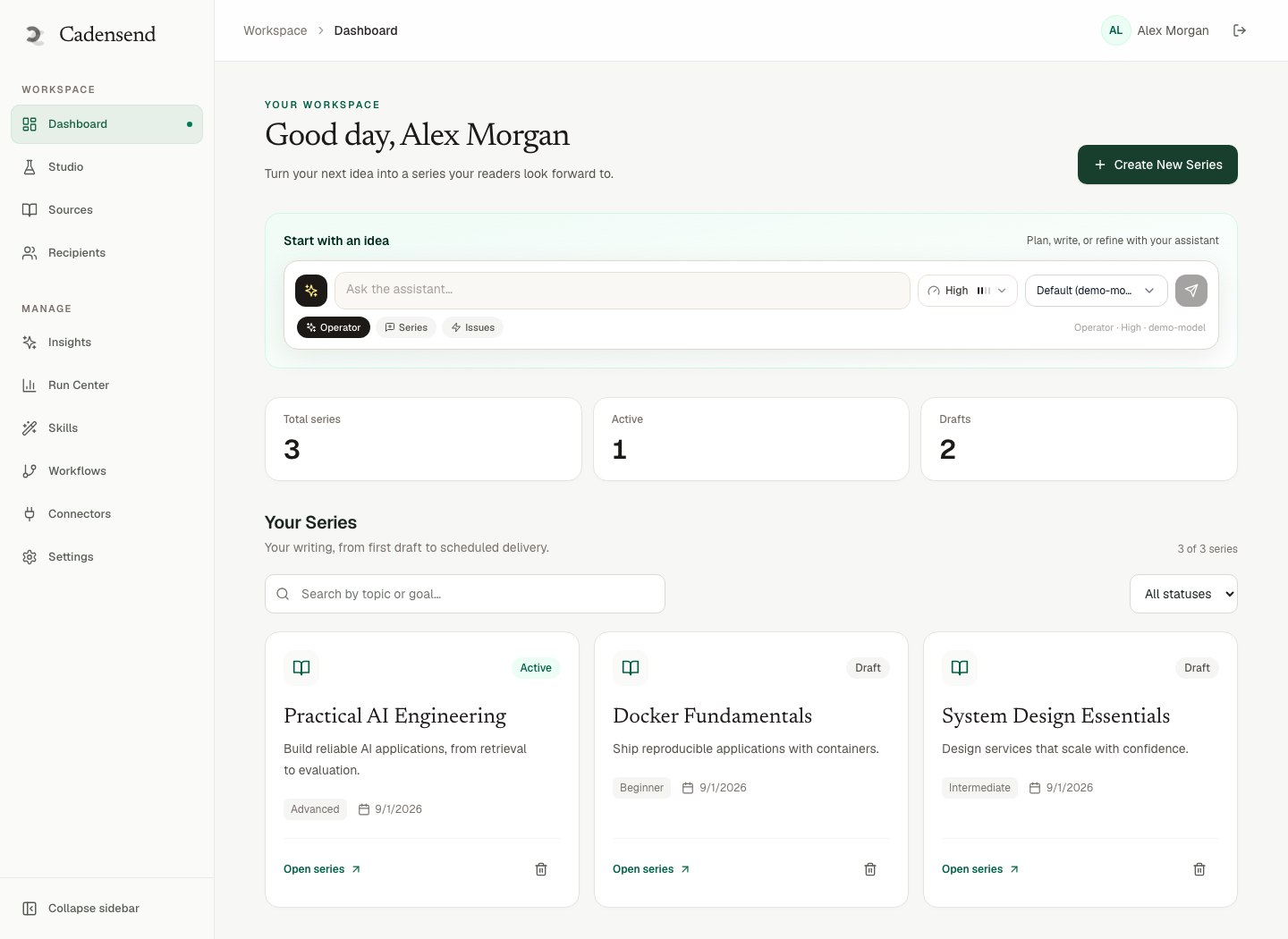
Cadensend is HinterBuild’s MIT-licensed, self-hosted email curriculum engine with no hosted signup. It plans a series from a learning goal, writes issues grounded in sources you upload, and delivers each issue once (GitHub). For a shop that should not create another SaaS account for “training,” self-hosting is the point.
What not to automate yet
- Refunds and credits over a threshold you set (example: $50).
- Hiring rejects with no human eyes.
- Medical, legal, or tax positions you will stand behind.
- Scraping competitors’ private communities.
- Customer recordings without a consent policy.
- Payroll changes.
FTC guidance on AI claims is a reminder that “powered by AI” does not excuse unfair practices (FTC on AI claims). If your chatbot promises a 90-day warranty your PDF does not contain, that is your problem.
Personal IDs in onboarding packets need privacy-safe document handling and the instincts in PII detection and scrubbing.
Vendors, cost, and risk
Buy in this order:
- One paid workspace seat of ChatGPT, Claude, or Gemini with training off — see ChatGPT vs Claude vs Gemini for daily use.
- Your existing Drive/Dropbox as the pack.
- A task manager for extracts.
- Only then, industry-specific AI (dental, legal, HVAC) with a data processing agreement.
Cost control: paste the page, not the whole Drive. Reducing LLM costs is relevant when you start batching reviews.
If a vendor wants to train on your customer emails, say no or anonymize. Self-host when the files are the business (clinics, law-adjacent, finance). When to self-host LLMs is the deeper frame; most shops should not start there.
NIST’s AI RMF is readable in the “govern / map / measure / manage” summary (NIST AI RMF). For a 12-person company, “measure” can be a monthly 20-minute review of AI mistakes in a shared doc.
A 30-day adoption plan
Week 1: Timer on your top three time sinks. No new tools.
Week 2: Build the source pack. Redact customer IDs from examples.
Week 3: Run proposals + punch lists with a human gate. Log errors (wrong price, wrong date, wrong name).
Week 4: Write two SOPs. Turn the worst error into a training issue. Decide whether email curriculum or a Project file is the delivery — default to something staff will actually open.
If week 3 error rate is ugly, do not buy an “AI employee.” Fix the pack.
Owners who want this as software with audit logs can contact HinterBuild. We would rather you stay on prompts until the workflow is real.
Invoices, complaints, and bookkeeping prep
Money language is where AI looks helpful and becomes expensive.
Invoices. Let the model draft line descriptions from your price list. You enter quantities and send from the accounting tool. Never let a chatbot email an invoice with a guessed tax rate.
Complaints. Paste the customer’s words and your policy PDF. Ask for: (1) what they asked, (2) which policy clause applies, (3) three reply options labeled refund / repair / decline with the clause quoted. You pick. If the model cannot quote the clause, the answer is not in the policy — talk to a human, including the customer.
Bookkeeping prep. Categorization suggestions from a bank-export CSV can save Sunday night. Require a “confidence / needs receipt” column. You still approve in QuickBooks or Xero. A mis-coded contractor payment is not a drafting error; it is a tax error.
Collections. A polite chase email from a template is fine. An AI that threatens legal action from a generic prompt is not. Keep counsel language in a file you actually paid a lawyer for.
Log every money-adjacent miss in the same error doc as quoting mistakes. After ten misses, the workflow is not ready to scale.
Frequently Asked Questions
I have no technical staff. Can I still use AI?
Yes. Start with a paid chatbot, a price list, and a rule that you send the email. Technical staff become necessary when you want systems that run unattended or touch customer databases.
Will AI replace my admin hire?
It can delay a hire if the work is drafting and filing. It will not greet clients, chase a flaky vendor in the real world, or own a messy exception. Track hours before you skip the hire.
How do I keep staff from pasting customer data into free ChatGPT?
Give them a paid workspace, a written rule, example redactions, and a consequence. A shared free login is how you lose control. Treat this like PCI: if you cannot explain the tool, do not use it on card data.
What is the first workflow I should try?
The one that is frequent, templated, and reversible: proposal drafts or internal SOPs. Do not start with customer-facing autonomous email.
Is industry-specific AI worth it?
After your pack exists and you know the errors generic tools make. Vertical tools help when they connect to your PMS/CRM. They still hallucinate. Keep the human gate.
Can I use AI to write employee reviews?
You can structure notes you already wrote. Do not generate a performance story from a job title. Reviews are personnel files — privacy-safe handling required. Be present for the conversation.
How does Cadensend help a small business?
When you need a repeatable teaching sequence from your SOPs and sources, emailed on a cadence, hosted by you, MIT licensed, no hosted signup. It is not a marketing blaster or a CRM.
When should I hire a consultant or agency?
When you need an integration, an audit trail, or an agent that takes actions. HinterBuild’s AI agent development is that step. Until then, contact us if you want a workflow review, not a pitch deck.
Conclusion
- Buy hours back on templated work first.
- Source packs are the moat; prompts are interchangeable.
- Humans keep the send button on money and promises.
- Train with a sequence, not a password.
- Count errors for two weeks before you believe a demo.
Small-business AI is operations with a language model in the middle. Treat it like a new junior hire: documented, supervised, and fired from tasks it fails.
Learn about HinterBuild or book a conversation. Written by the HinterBuild Engineering Team. Connect with Abdul Sami on LinkedIn.
Free consultation
Book a free consultation call on AI for small businesses
30-minute call with the HinterBuild team. Discuss your project, architecture questions, or next steps — no obligation.
Book a meeting
Keep reading
Related articles
Voice Notes to Action Items with AI
Turn voice notes into action items with AI: capture on the walk, extract owners and dates, and file tasks without inventing commitments you never made.
Read post
Stop AI Making Up Facts in Work Reports
Stop AI making up facts in reports with a source pack, quote-enforced drafts, and an unsupported-claims pass before anything leaves your name.
Read post
Second Brain with AI: Notion, Obsidian, Email
Build a second brain with AI in Notion, Obsidian, or email. Capture once, retrieve with quotes, and keep notes you own as the system of record.
Read post
Privacy-Safe AI for Personal Documents
Use privacy-safe AI on personal documents without leaking IDs, contracts, or health data. Redact, isolate vendors, and keep sources under your control.
Read post