
Turn Documentation Into Email Curriculum
Turn documentation into an email curriculum with structure-aware ingestion, cited issues, prerequisite checks, and self-hosted delivery to you only.

Muhammad Abdul Sami
· 12 min read
- Learning
- Documentation
- RAG
You can turn documentation into an email curriculum when the docs are ingested as structure, not as a bag of tokens. HinterBuild's Cadensend is an open-source MIT email curriculum engine: one learning goal plus your sources become a cited series. Self-host it. There is no hosted signup. The MVP sends only to your verified address. It is not a CRM, marketing tool, or bulk sender.
This guide is the docs-to-syllabus path: heading-aware parse, intact code and tables, section anchors for citations, coverage validation, and delivery that cannot double-send. Official docs already have a teaching order if you respect it. Models that ignore headings invent a new order and a new API. Clone Cadensend on GitHub. Retrieval is RAG and LLM systems; queues are backend API engineering.
Key Takeaways:
- Treat documentation as a curriculum graph: headings are modules, not decoration.
- Structure-aware chunking keeps code fences and tables whole so citations are clickable locations.
- The planner must validate coverage and prerequisites against the outcome you wrote.
- Cadensend grounds every claim in sources you supplied; the renderer, not the model, emits citation links.
- Self-hosted MIT. MVP: verified address only. No hosted signup, no list sending.
- Bad docs still make bad courses — fix the corpus before you scale cadence.
Table of Contents:
- Why Docs Sites Fail as Courses
- Map Diátaxis to Email Issues
- Ingest HTML and Markdown Without Flattening
- Plan Coverage From Real Headings
- Write Issues That Cite Anchors
- Worked Example: An Internal API Handbook
- When the Docs Are a GitHub Repo
- Versioned Docs, Changelogs, and Stale Screenshots
- Frequently Asked Questions
Why Docs Sites Fail as Courses
Short answer: Docs are random-access. Courses are sequential. Search dumps both into the same context window.
Engineers use documentation as a dictionary. Learners need a tour. If you paste a sitemap into a chatbot, you get a tour that skips authentication and spends three pages on an edge-case flag. Cadensend's Plan stage exists to impose outcome, audience, includes, and excludes before generation.
The other failure is retrieval. A RAG pipeline that returns garbage will quote the changelog in the "getting started" issue. Embeddings do not know that h1 "Deprecated" is less useful than h1 "Quickstart" unless you preserve structure and metadata.
Hallucinated methods in a docs-based course are uniquely damaging because the reader thinks they came from the vendor. Read LLM hallucination causes and fixes and avoid AI hallucination in educational content. Grounded AI writing is the same citation compiler.
Cadensend is not a help-center widget and not a blast ESP. See open source email course platforms for that comparison, and the product page for scope. HinterBuild is the studio that built it.
Map Diátaxis to Email Issues
Short answer: Tutorials, how-to, reference, and explanation want different issue shapes.
The Diátaxis framework splits documentation into four modes. Email curricula that mix all four in one issue feel like noise.
| Diátaxis mode | Email issue shape | Cadensend brief hint |
|---|---|---|
| Tutorials | One happy path, numbered | Outcome: complete the path |
| How-to | Goal-oriented, assumptions listed | Exclude adjacent products |
| Reference | Short, cited, link-heavy | Do not paraphrase tables; cite them |
| Explanation | Why, with prerequisites | Place after the tutorial that motivates it |
Your series outcome decides the mix. "Onboard a new backend hire to our HTTP API" is mostly tutorial plus a little reference. "Understand why we chose skip-locked queues" is explanation citing an ADR — closer to a personal knowledge series. "Ship a stdlib CLI in 30 days" is programming by email.
Cadence follows mode. Reference snippets can be daily and short. Explanation wants cadence and timezone with more space. Delivery must still be exactly once.
Curriculum design for email modules is the graph view: modules, locks, prerequisite edges.
Ingest HTML and Markdown Without Flattening
Short answer: Fetch, parse, chunk, embed, verify — hashed and resumable.
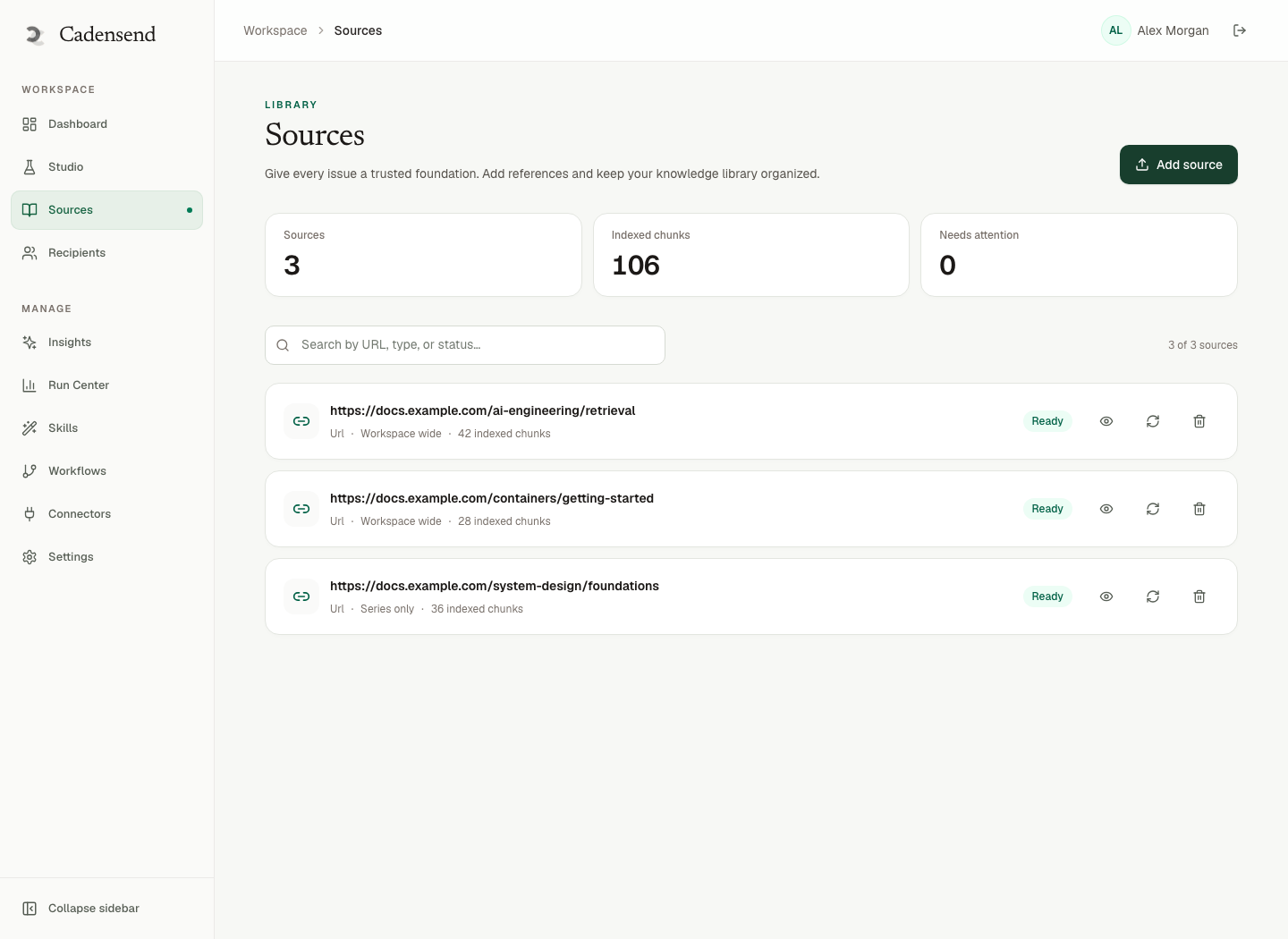
Cadensend's Ground pillar: upload files or URLs. Structure-aware ingestion preserves heading hierarchy, keeps code and tables intact, and records section anchors. A citation can land on #rate-limits, not "somewhere in the PDF."
Idempotent ingestion is content-hash keyed. Re-crawling yesterday's docs should not duplicate vectors. That is the same discipline as idempotency in distributed systems. Workers that fetch URLs need SSRF controls, size and type limits, and sanitization — Cadensend's hardened ingestion list. HinterBuild RAG engagements treat fetched HTML as hostile.
Practical ingest rules for docs sites:
- Prefer versioned URLs (
/docs/v2/) so embeddings do not mix v1 and v2. - Drop obvious chrome (global nav duplicated on every page) or it dominates similarity search.
- Keep tables: rate limits and enum values die when converted to prose.
- Scope retrieval to the series so a second product's docs cannot leak.
- Diversify by source so one giant "API reference" file cannot occupy five slots.
If search still fails, debug as RAG garbage, not as a prompt tweak. The embeddings guide explains why cosine on bad chunks cannot recover meaning.
Plan Coverage From Real Headings
Short answer: The planner proposes modules; validation checks the outcome against retrieved headings.
Create Series: topic, includes, excludes, outcome, audience, cadence, timezone, tone. The LangGraph-style planning graph (LangGraph) emits issues, then checks coverage and prerequisite order, with a revision pass on failure.
Example: outcome "authenticate and list projects." If the plan never includes the auth heading that ingestion saw, validation fails. If "list projects" precedes "get a token," prerequisite order fails. You fix this in Plan Studio rather than in a 2,000-token prompt.
Lock approved issues so a regen of later weeks cannot rewrite week 1. That lock is an identity, like a sent email version in exactly-once delivery.
Do not ask the planner to invent pages you did not ingest. If a concept is missing from docs, add a source or drop it from the outcome. Silent invention is educational hallucination.
Write Issues That Cite Anchors
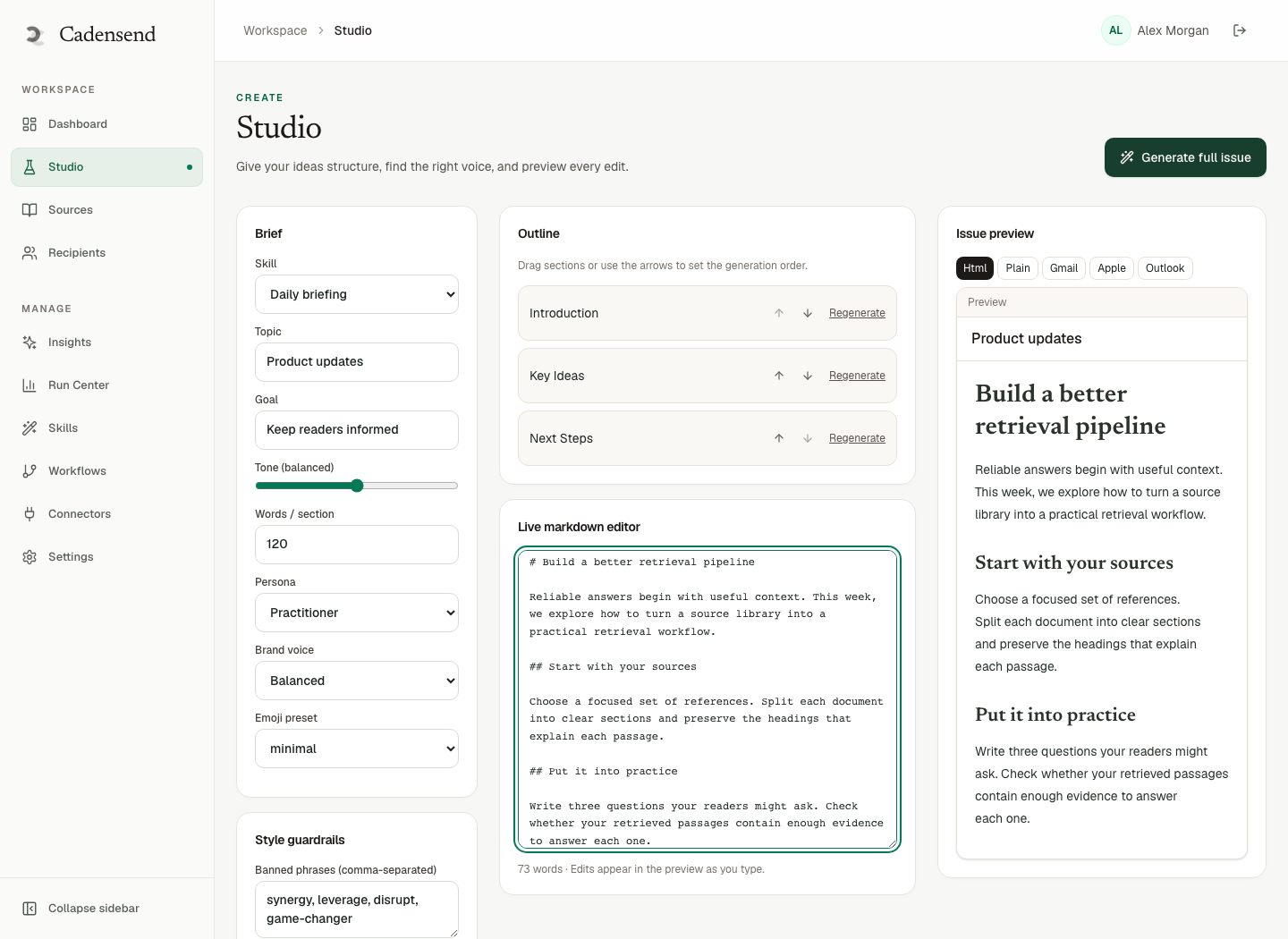
Short answer: Retrieve, write a block AST, critique, gate, render citations deterministically.
The writer is bounded. No arbitrary network, no code execution. Retrieval returns content and metadata only. Tool inputs are schema-validated. Prompt injection from a docs page cannot add a "send to my list" tool — there is no list, and tools are allowlisted. See Cadensend security.
Output is not raw HTML. A deterministic renderer produces HTML and plain text. Citations are source + chunk ids resolved to links. Fabricated footnotes fail at render or at the quality gate.
Editorial workspace: edit subject and preheader, inspect retrieved context, regenerate one section, diff versions. That is how you keep a grounded newsletter-quality issue while remaining a course.
Diagrams as data (Mermaid/D2 → SVG → PNG for email, alt required) beat screenshots that rot when the docs UI changes.
Worked Example: An Internal API Handbook
Short answer: Outcome "review a PR against our HTTP guidelines"; sources handbook + two ADRs.
Ingest the handbook HTML and the ADR Markdown. Exclude the public marketing site. Audience: new senior engineer.
Plan might be: auth headers, idempotency keys, error shape, pagination, versioning, changelog policy. Issue 3 on idempotency should cite the same ideas as our public idempotency post only if that post is in the corpus — otherwise cite the internal ADR. Do not mix public blog claims into an internal series without ingesting them.
Schedule Monday/Wednesday 07:30 America/Chicago (cadence). Deliver with skip-locked jobs (skip locked, exactly once). MVP: your verified inbox, not the whole engineering org.
If the handbook is the GitHub docs/ folder, the sibling workflow is technical email course from a GitHub repo.
When the Docs Are a GitHub Repo
Short answer: URL ingest of raw or rendered docs, plus README, still needs structure and scope.
Repos mix code, licenses, and docs. Filter to the documentation tree or you will embed node_modules samples and jokes in CONTRIBUTING.md. GitHub's repository docs are a reminder that README is not a curriculum by itself.
Cadensend still does not scrape the entire internet. You point at sources you own or have rights to use. The writer does not browse. Self-host from GitHub HinterBuild/cadensend. No hosted signup.
For choosing tools, open source email course platforms vs Cadensend: ESPs send lists; Cadensend sequences a syllabus to you.
Need this wired onto an existing docs pipeline? Contact on docs-to-email curricula. HinterBuild about, RAG, backend.
Versioned Docs, Changelogs, and Stale Screenshots
Short answer: Pin the version you teach. Re-ingest on purpose. Do not let changelogs masquerade as tutorials.
Documentation sites ship three clocks: the product version, the page last-updated, and the learner's memory. A series that mixes /docs/v2/auth with /docs/v3/auth will invent a hybrid API that exists nowhere. Put the version in the series brief and ingest only that tree.
Changelogs are reverse-chronological. They are a valid source for one "what changed in this release" issue. They are a bad spine for the whole curriculum. If the planner proposes twelve changelog issues, reject coverage: the outcome was almost certainly "use the product," not "recite the git log."
Screenshots of the docs UI rot faster than headings. Prefer citations to HTML anchors. If you need a diagram, use Cadensend's spec-to-PNG path (Mermaid/D2 with alt text) so the picture is generated from the same issue AST as the prose. That is grounded writing, not a folder of screenshot-final-v7.png.
When docs move a heading, content hashes change and re-ingest updates vectors. Already-sent issues stay sent: exactly-once keys include issue version, not "whatever the docs say today." If the handbook is now wrong, bump the issue version after a human edit — do not mutate a sent body.
OpenAPI fragments belong in the corpus when the outcome is "call the HTTP API." They do not belong when the outcome is "explain why we chose skip-locked queues"; that is ADR territory. Mixing both without excludes is how embeddings retrieve a status-code table into a strategy lesson.
Delivery remains a Postgres claim with skip locked. A correct syllabus that double-sends is still unread. Cadence still uses IANA + UTC (cadence and timezone). MVP is still your verified address.
Frequently Asked Questions
How do I turn documentation into an email curriculum without hallucinating APIs?
Ingest the canonical docs, plan against headings, retrieve with series scope, and fail issues that assert uncited signatures. Cadensend's citation renderer cannot invent links. See hallucination fixes.
Can I email the curriculum to all customers who use the product?
Not with Cadensend MVP. Sends go only to your verified address. Customer lists need consent, suppression, and unsubscribe — later, and not by pretending the MVP is an ESP.
What documentation formats work best?
HTML or Markdown with headings, code, and tables. Flattened PDFs and screenshots of docs are last resorts. Structure-aware parse is the point.
How often should I re-ingest docs?
When the version you teach changes. Content-hash ingest makes re-fetch cheap. Pin a version in the series brief so the planner does not mix releases.
Is this the same as a changelog newsletter?
No. Changelogs are reverse-chronological. A curriculum is prerequisite-ordered. You can ingest a changelog as a source for one "what's new" issue, not as the whole plan.
Does Cadensend replace our documentation site?
No. It teaches from the site (or the repo). Citations should send you back to the canonical page.
Is there a hosted docs-to-email product from Cadensend?
No. Clone the MIT repo and run it yourself.
Who implements docs-to-email for an internal academy?
Contact HinterBuild. Related: about, RAG LLM systems, backend API engineering.
Conclusion
Turn documentation into an email curriculum by preserving structure, planning against real headings, citing anchors, and sending exactly once to yourself.
- Diátaxis modes → issue shapes.
- Hash ingest; scope retrieval.
- Lock approved issues; version sends.
- Self-host MIT Cadensend; no lists.
Start at Cadensend and GitHub, or schedule a consultation. More about the studio.
Connect with Abdul Sami on LinkedIn.
Free consultation
Book a free consultation call on docs-to-email curricula
30-minute call with the HinterBuild team. Discuss your project, architecture questions, or next steps — no obligation.
Book a meeting
Related Articles
- Personal Knowledge Email Series From Notes
- Learn a Programming Language by Email in 30 Days
- Email Learning Cadence and Timezone That Gets Read
- Exactly-Once Email Delivery for Courses
- Open Source Email Course Platforms
- Technical Email Course From a GitHub Repo
- Grounded AI Writing for Newsletters
- Avoid AI Hallucination in Educational Content
- Curriculum Design for Email Modules and Prerequisites
Keep reading
Related articles
Technical Email Course From a GitHub Repo
Build a technical email course from a GitHub repo: ingest README and docs, plan cited issues, self-host Cadensend, send only to your verified address.
Read post
Personal Knowledge Email Series From Notes
Turn a personal knowledge email series from notes, PDFs, and bookmarks into a cited, scheduled curriculum you send only to yourself.
Read post
Learn a Programming Language by Email in 30 Days
Learn a programming language by email in 30 days using official docs as sources, a cited curriculum, and sends only to your verified address.
Read post
Curriculum Design for Email Modules and Prerequisites
Curriculum design for email modules means validated plans, prerequisite order, locked issues, and Cadensend’s Plan stage before any grounded send.
Read post