
Self-Host an Email Course on Your Laptop
Self-host an email course on your laptop with Cadensend: clone the MIT repo, attach sources, and send grounded issues to yourself.

Muhammad Abdul Sami
· 13 min read
- Self-Hosting
- Email Courses
- Cadensend
- PKM
Self-host an email course on your laptop when the syllabus should live next to your notes, not on a vendor’s list. Cadensend is HinterBuild’s MIT-licensed email curriculum engine. You clone it, run it yourself, attach sources you supply, get structural citations, scoped retrieval, and exactly-once delivery. There is no hosted signup. The MVP sends only to your verified address. That is a feature: you can teach yourself from a PKM corpus without becoming a bulk sender.
This walkthrough is operational: what you run, what you plug in, what will break when the lid closes, and how that differs from ConvertKit or Ghost. Code: GitHub. If you want the same architecture on a team cluster, contact HinterBuild or read About.
Key Takeaways:
- Laptop hosting is valid for a personal grounded series; it is invalid as a stealth ESP.
- You provide LLM keys, an email provider (or local catcher), and Postgres — Cadensend is free software, not a cloud SKU.
- Sleep/wake requires durable jobs and idempotent sends, not
setInterval.- Sources stay on your machine; scoped retrieval should not phone a random web agent.
- DNS auth still matters once mail leaves localhost.
Table of Contents:
- Why a Laptop Is a Reasonable School
- What You Actually Run
- Sources, PKM, and Grounding On-Device
- Sending Off the Machine Without Becoming an ESP
- Sleep, Restarts, and Exactly-Once
- When to Move Off the Laptop
- A First Weekend Plan
- Frequently Asked Questions
Why a Laptop Is a Reasonable School
Short answer: A personal curriculum has one student, one corpus, and a high cost of leaking notes. Local is the honest MVP.
SaaS course tools want a list. Ghost wants a theme. Kit wants subscribers. Cadensend wants a learning goal. If the goal is “I will finally read my own annotated PDFs in order,” a laptop is enough. HinterBuild’s positioning is narrow: not a marketing suite, not a CRM, not an autonomous research agent, not a bulk sender.
Local also matches how PKM already works. Obsidian vaults and paper folders are files. Uploading them to a random “AI course generator” with a hosted account is how private notes become training lore. Cadensend’s writer has no arbitrary network or code-execution tool. Retrieved content is data, never instruction. You still must trust your LLM provider with the chunks you send — that is the remaining leak surface. Prefer a provider you already use, and do not attach secrets; if you need scanning, that is a different product conversation.
Compare categories in ConvertKit vs Ghost vs Cadensend. ChatGPT Projects stay in OpenAI’s cloud (Projects vs syllabus). A laptop Cadensend instance is the option when the delivery rail and the citation renderer must be yours.
When to self-host LLMs is a sibling question about models. You can self-host Cadensend and still call a hosted LLM. You can also point embeddings at a local model. Either way, the curriculum engine is local.
What You Actually Run
Short answer: App + Postgres + vector store + LLM API + mail API (or Mailpit). Clone; do not register.
Cadensend itself is free. You pay infrastructure you already have (the laptop) plus providers you choose. Typical local shape:
| Piece | Role | Laptop note |
|---|---|---|
| Cadensend app | Plan / Ground / Write / Deliver UI and workers | Docker or native; see the repo README |
| Postgres | Durable queue, delivery keys, series state | Do not use an in-memory DB if you care about exactly-once |
| Vector store | Scoped embeddings | Private, authenticated; product calls for TLS in real deploys |
| LLM | Plan + write graphs | Your key; no Cadensend-hosted model |
| Provider HTTPS API | MVP verified address; or a local catcher for dry runs |
Read the repository for current compose files. This article will not invent CLI flags that might drift. Principles will not drift:
- No signup form on hinterbuild.com that creates a tenant for you.
- Delivery keyed on workspace, issue, recipient, version; row before provider call.
- Ingestion content-hash keyed and resumable.
- Retrieval filtered to workspace and series before the vector query.
If you already operate RAG/LLM systems, this looks familiar. If you do not, start with embeddings and why RAG returns garbage. Laptop or not, an unscoped index will quote the wrong file.
Create Series wizard: topic, includes/excludes, outcome, audience level, cadence, timezone, tone. Plan Studio: reorder, edit objectives, lock approved issues. Content Studio: subject, preheader, retrieved context, section regen, diffs. Run Center: job states and stable error codes.
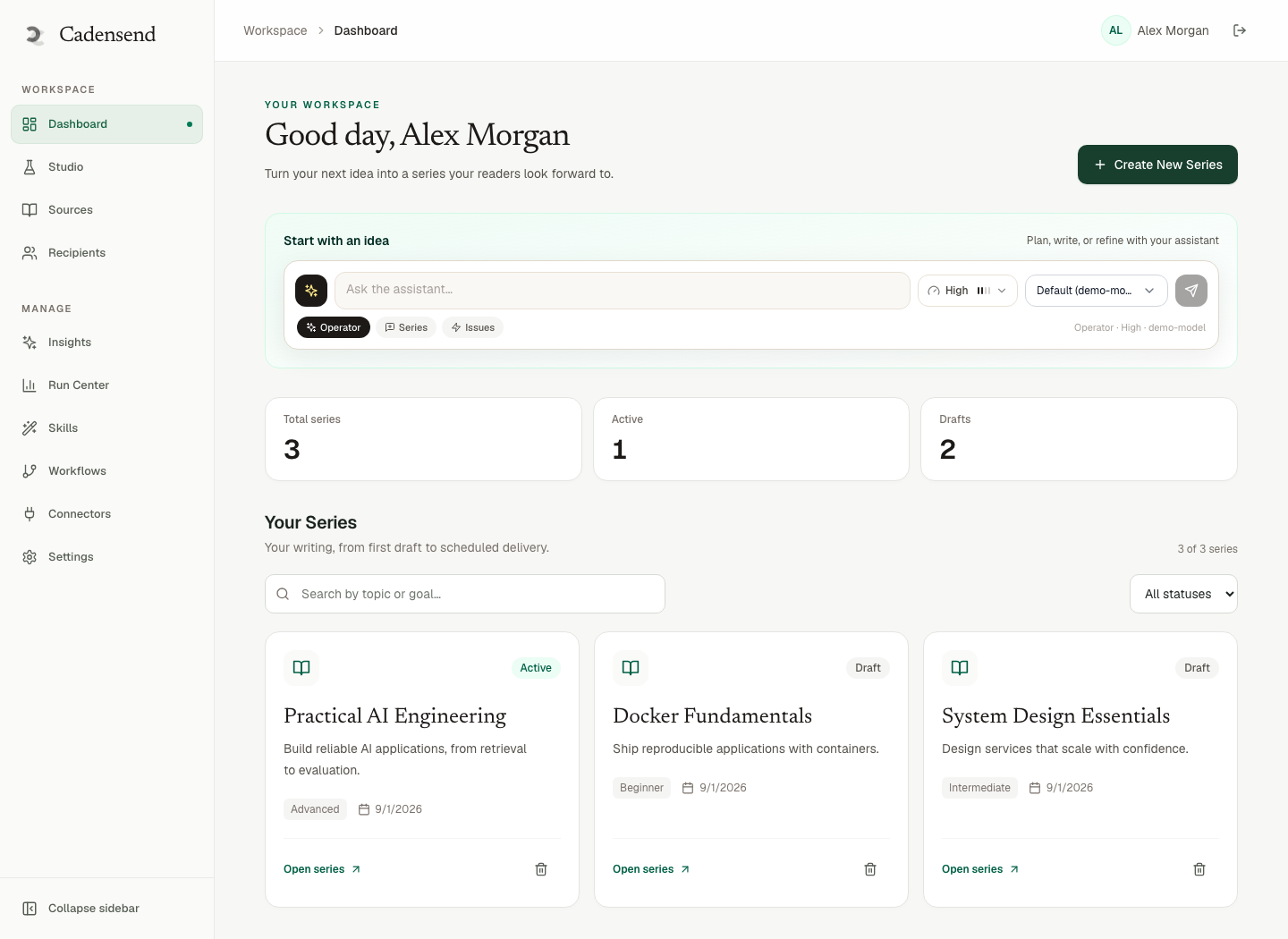
Figure 1: The dashboard is your local school control plane, not a subscriber CRM.
Sources, PKM, and Grounding On-Device
Short answer: Point Cadensend at the files that are allowed to be true. Everything else is out of bounds.
Structure-aware ingestion keeps heading hierarchy, code, tables, and section anchors so a citation lands on a real location. That is why laptop paths and local URLs (or uploaded copies) beat “browse the web and write a course.” The writer cannot browse freely anyway.
Practical PKM loop:
- Export or copy the notes for this series into a folder (do not dump the entire messy vault if half is grocery lists).
- Ingest; wait for hash-keyed embed/verify.
- Generate issue 1; inspect retrieved chunks.
- If chunks are wrong, fix chunking/source set — do not prompt harder (RAG vs fine-tuning vs prompting).
- Refuse invented citations (attach sources; hallucination).
SSRF controls, size/type limits, and sanitization still apply when the URL is “local.” Do not ingest file:///etc/passwd style mistakes; treat the uploader as untrusted even when the untrusted party is you on a bad day.
PII in notes is your problem. Educational issues should not parrot a client’s name from a random memo you accidentally ingested. HinterBuild’s production stance is tenant isolation in every repository query; on a laptop you are the only tenant — still do not mix a client dump into a public-bound series you might later paste into Ghost.
Sending Off the Machine Without Becoming an ESP
Short answer: Use a transactional API to your address, or a local SMTP catcher. Do not BCC a cohort.
Dry run: Mailpit, MailHog, or similar captures MIME on localhost. You can inspect subject, preheader, text part, and citation links without touching reputation.
Real inbox: Postmark, SES, etc., authenticated domain (avoid spam filters). SPF/DKIM/DMARC still count for mail-to-self through a provider. Gmail consumer SMTP will rate-limit you; it is acceptable only as a toy.
Cadensend is not ConvertKit: no landing page, no list import. It is not Ghost: no public archive unless you build one later (roadmap). Educational vs receipts: transactional vs educational email. Do not send password resets through the course app.
Subject and preheader: edit in studio (subjects, preheaders). Timezone: IANA + UTC instant (timezone-correct scheduling).
Sleep, Restarts, and Exactly-Once
Short answer: Laptops sleep. In-memory timers lie. Postgres keys do not.
This is the number-one laptop failure. You approve send, close the lid, reopen, worker retries, two copies. Cadensend’s Deliver pillar exists because HinterBuild refused that bug: write delivery before provider call; FOR UPDATE SKIP LOCKED; zero duplicate deliveries tolerated; claim lag and send lag budgets in the blueprint.
Read the plain-language version in idempotent sends explained simply and the systems version in idempotency in distributed systems. The same claim pattern appears in system design for 10 million users. You are not at 10 million. You are at lid-close.
Catch-up after a long sleep should not flush six issues in sixty seconds. Bursting looks like a bot. Prefer send-next-and-re-space, after confirming keys.
Docker Desktop upgrades will kill containers. Unique indexes are your memory across those kills. Back up Postgres if the series matters. The markdown sources in your PKM are the corpus backup; the delivery ledger is the send backup.
When to Move Off the Laptop
Short answer: Move when uptime, not when vanity. Audiences wait for consent features.
Stay on a laptop while:
- Recipient is you.
- Corpus is private notes.
- You can tolerate minutes of lag after sleep (p95 budgets are for a running machine).
Move to a small VPS when:
- You want sends while you fly (still one address).
- You want TLS-only vector store and KMS-backed secrets as in the security notes.
- Postgres backups should not be “that one volume on a Mac.”
Do not move in order to blast a list from Cadensend today. Opt-in audiences, suppression, unsubscribe, analytics are later updates. Using a VPS does not make unauthorized bulk legal or in-scope.
If you outgrow personal teaching and need a company training surface, that is Update 4 territory (SSO, audit) plus contact. Until then, laptop + verified address is the honest product.
A First Weekend Plan
Short answer: Saturday is corpus and plan. Sunday is one grounded issue to Mailpit, then one to your real inbox.
Saturday morning — install without mythology. Clone Cadensend. Bring up Postgres and the app as the README specifies. Do not invent a hosted login. Confirm the UI loads. Create a throwaway series titled smoke-test with timezone America/Chicago (or yours). You are proving the wizard, not teaching yet.
Saturday afternoon — shrink the vault. Copy five files that are allowed to be true for one outcome (“explain scoped retrieval to myself”). Leave the rest of Obsidian out. Ingest. Wait until verify is green. If ingest fails, fix types and sizes; do not disable SSRF guards. Read why RAG returns garbage if chunks look like mashed tables.
Saturday evening — plan, do not send. Generate a plan. Check prerequisite order. Lock nothing until you agree with issue 1’s objective. Write a subject (learning subjects) and preheader (preheaders) by hand for issue 1 even if the model proposed copy. If the proposal names a paper you did not attach, you just caught invented citations.
Sunday morning — Mailpit. Point mail at a local catcher. Send issue 1. Inspect MIME: text part, citation hrefs, no fake unsubscribe. Kill the worker mid-send and click again. You should not get two messages. If you do, your unique key is wrong (idempotent sends).
Sunday afternoon — real inbox. Authenticate a subdomain if you have not (spam filters). Verify the recipient is you. Send v1 of issue 1 (or skip if Mailpit already used that key — bump version only if you intend a new MIME). Schedule issue 2 for a human hour in IANA, not “in 30 seconds five times.”
Sunday evening — lid test. Close the laptop for an hour mid-scheduled-window if you can do so safely. Reopen. Confirm catch-up did not burst. Confirm Run Center shows one delivery row.
What you will not do this weekend: import a CSV of coworkers, connect a purchased list, or paste ChatGPT into Kit and call it Cadensend (Projects vs syllabus, ConvertKit vs Ghost vs Cadensend). Educational vs receipts: keep resets out (transactional vs educational).
If compose is painful, that is an engineering weekend, not a content weekend. HinterBuild’s RAG/LLM retainers start there for teams. Solo learners should stick to the README and file issues on GitHub rather than inventing flags.
Frequently Asked Questions
Can I self-host Cadensend on a laptop?
Yes. It is open source, MIT, no hosted signup. Clone GitHub and run it with your own Postgres, LLM, and mail wiring.
Will it keep sending when my laptop is shut?
No. Shut is shut. Use durable jobs so when it wakes it does not duplicate, or run a small always-on host if you need unattended cadence.
Is there a Cadensend cloud login?
No. Anyone promising a hosted Cadensend signup on a third-party site is not the product.
Can I mail my students from my laptop instance?
Not in MVP, and not by BCC. The current build sends to your verified address only. Consent and suppression are later work.
Does local hosting fix hallucinations?
It fixes data residency of your files, not model invention. You still need attached sources, scoped retrieval, and structural citations.
Do I need a GPU?
Not for Cadensend the engine. You might for a local LLM. Most people call a hosted LLM API from the laptop app.
How is this different from running Ghost locally?
Ghost is a CMS plus newsletter. Cadensend plans a curriculum, grounds writing, and delivers issues exactly once. Different primary object (series vs post).
Conclusion
- Self-host an email course on your laptop with Cadensend when the student is you and the corpus is yours.
- Clone the MIT repo; bring LLM, mail, and Postgres; do not look for a signup.
- Durable idempotent delivery is mandatory because laptops sleep.
- Grounding still depends on sources and scoped retrieval, not on the hostname.
- Leave the laptop when you need unattended uptime — not when you want a stealth list.
Start at Cadensend and the repo. Wiring help: contact. About · LinkedIn.
Free consultation
Book a free consultation call on self-hosting Cadensend locally
30-minute call with the HinterBuild team. Discuss your project, architecture questions, or next steps — no obligation.
Book a meeting
Keep reading
Related articles
Self-Hosted Email Course vs ConvertKit
Self-hosted email course vs ConvertKit: a curriculum engine versus a marketing suite, and what Cadensend's MVP can and cannot send.
Read post
ChatGPT Projects vs a Personal Email Syllabus
ChatGPT Projects hold files for chat. A personal email syllabus sequences grounded issues. Cadensend is the engine for the second job.
Read post
Write a 7-Day Email Onboarding Course
Write a 7-day email onboarding course with objectives, sources, and exactly-once delivery — without treating a curriculum engine like a CRM.
Read post
Turn PDF Notes Into an Email Course
Turn PDF notes into an email course: ingest documents, plan modules, ground every claim, and schedule issues with real citations.
Read post