
Timezone-Correct Email Scheduling Guide
Timezone-correct email scheduling stores UTC beside the IANA zone so DST does not move lessons. Cadensend freezes existing schedules.

Muhammad Abdul Sami
· 12 min read
- Email Scheduling
- Timezones
- DST
- Cadensend
Timezone-correct email scheduling means “8:00 on Thursday in America/Chicago” stays 8:00 local even when daylight saving shifts UTC offset. Storing only a UTC timestamp without the zone throws away intent. Storing only “8:00” without a zone makes the send time a function of whatever server you deployed to. Cadensend is a self-hosted MIT email curriculum engine that stores the UTC instant beside the original IANA zone, preserving local intent across DST without shifting existing schedules. No hosted signup. MVP: your verified address only.
This matters for PKM → email series: Future You in Paris should not receive issue 2 at 3 a.m. because you planned it at a café in Chicago. HinterBuild publishes the code on GitHub. Questions: contact.
Key Takeaways:
- Persist IANA zone (
America/Chicago) plus the computed UTC instant; never “server local” clock.- DST transitions change offsets; recompute from zone + wall time only when intent is wall-clock, and freeze UTC for already-approved issues.
- Cadensend does not move existing schedules when you later edit the series timezone.
- Wrong-hour mail looks like spam and gets deleted — a deliverability issue, not only UX.
- Idempotent sends still apply: a DST “catch-up” must not duplicate an issue version.
Table of Contents:
- Wall Time vs Instants
- IANA Zones, Not Offsets
- DST, Gaps, and Overlaps
- Cadensend’s Freeze Rule
- Schedulers That Survive Sleep
- Learners Who Travel
- Worked Example: Chicago DST and a Thursday Series
- Frequently Asked Questions
Wall Time vs Instants
Short answer: Humans schedule wall time (“Monday 8am”). Computers fire instants (2026-11-02T14:00:00Z). You need both.
| What you store | What you can do | What you break |
|---|---|---|
| UTC instant only | Sort a global queue | Cannot explain “8am Chicago” after DST |
| Wall time only | Show a friendly clock | Cannot fire correctly from a UTC worker |
Offset (-05:00) only | Looks precise | Future DST rules are missing |
| IANA zone + UTC instant | Display intent and fire once | Needs a freeze policy for approved issues |
If you only store UTC, you cannot answer “what did the author mean?” when Chicago leaves DST. If you only store wall time, you cannot sort a global queue. The pair is the design.
Cadensend’s Create Series wizard captures cadence and timezone up front with topic, audience, and tone. That timezone is the series’ teaching clock. Issues get fire times from the plan. Approved issues should keep their instant so a later wizard edit does not rewrite history.
This is unrelated to ConvertKit’s “delay 2 days” automations, which are duration-based, not IANA-aware syllabi. Ghost newsletter send time is usually “now” or a single stamp. Category recap: ConvertKit vs Ghost vs Cadensend.
Educational mail is cadence-shaped; transactional mail is event-shaped (transactional vs educational). Do not delay a password reset until 8am local. Do delay lessons until 8am local.
IANA Zones, Not Offsets
Short answer: Store Europe/Paris, not +01:00. Offsets do not know future DST rules.
The IANA time zone database (tzdb) is the standard. Libraries like zoneinfo in Python or Temporal in modern JS consume those identifiers. Offsets are snapshots. UTC-5 in November is not UTC-5 in July for Chicago.
Also avoid:
EST/PSTabbreviations (ambiguous, not unique).- Browser
getTimezoneOffset()persisted as the series zone (changes when you travel). - Docker host TZ leaking into jobs (
TZ=UTCin compose is good for machines, bad as learner intent if you never stored IANA).
Cadensend is explicit: original IANA zone is preserved. That is how a laptop instance (self-host on a laptop) can sleep in airports without rewriting the syllabus into UTC-from-wherever-I-opened-the-lid.
About HinterBuild engineering work on calendars and jobs uses the same rule. RAG/LLM systems do not replace tzdb. Retrieval answers what to teach; tzdb answers when.
DST, Gaps, and Overlaps
Short answer: Spring-forward skips a wall-clock hour; fall-back repeats one. Your scheduler must pick a policy.
If issue 7 is “2:30 a.m. local” on a spring-forward night in a US zone, that wall time may not exist. Policy options: skip forward to 3:30, skip back to 1:30, or forbid sub-3am sends in the wizard (recommended for teaching). Cadensend’s product intent is learning at human hours, not on-call pages.
Fall-back: 1:30 a.m. happens twice. Policy: use the earlier instant or the later, but store the chosen instant so a retry does not send both. This is why scheduling and idempotent email sends are one system. A DST overlap plus an at-least-once queue is a duplicate factory. See also idempotency in distributed systems.
Wrong-hour bursts look automated. People hit junk (avoid spam filters). Subject and preheader will not save a 3 a.m. lesson (subjects, preheaders).
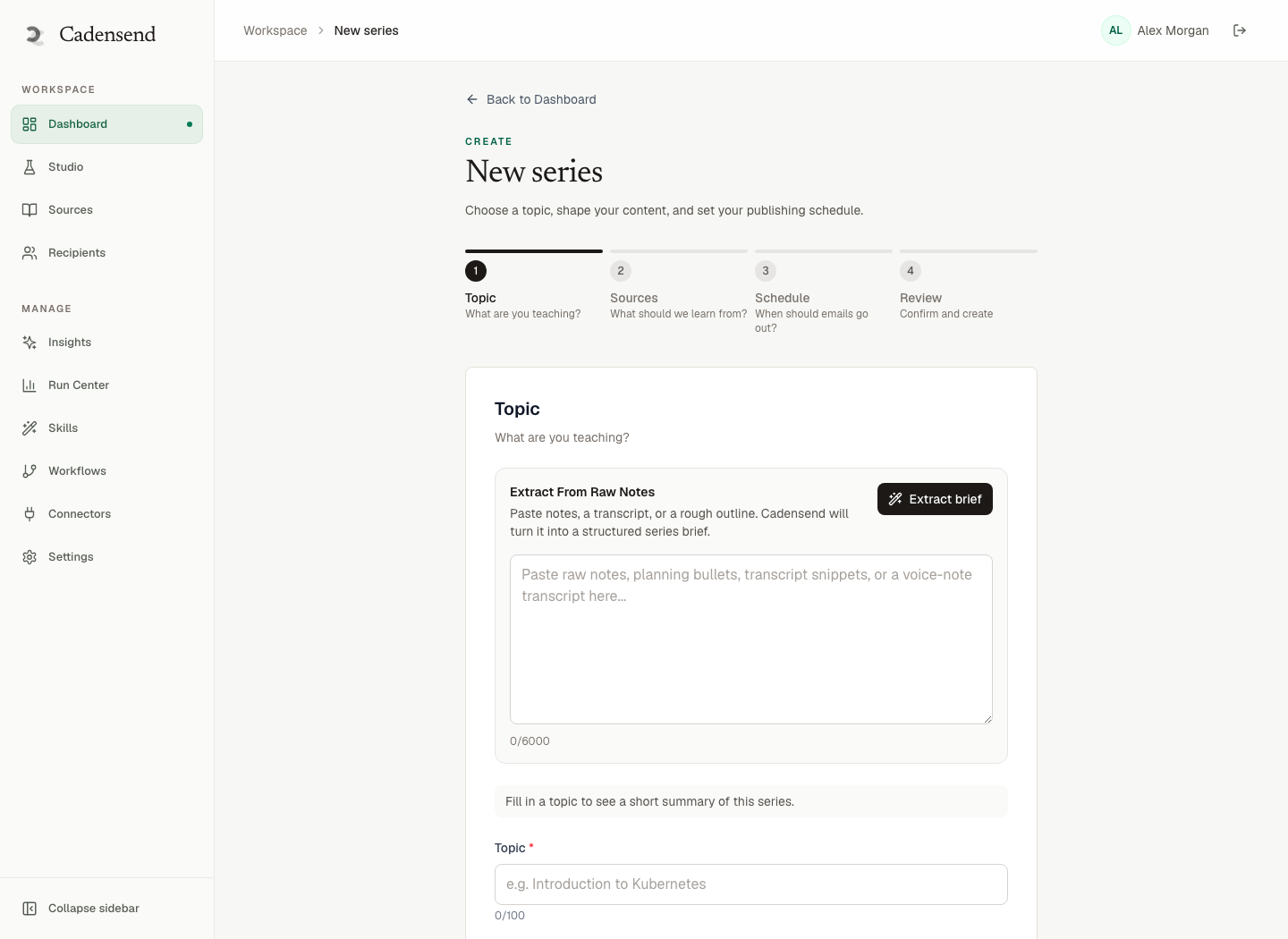
Figure 1: Capture IANA timezone when you create the series, not after the first misfire.
Cadensend’s Freeze Rule
Short answer: Changing the series timezone later must not slide already scheduled issues.
If you planned in America/Chicago and move to Europe/Berlin for new issues, old approved issues should keep their stored UTC instants (and original zone for display). New issues can use Berlin. Plan Studio locks approved issues so regeneration of neighbors does not rewrite send times either.
This freeze is the calendar analogue of citation immutability: grounded HTML should not grow new footnotes after approval; grounded schedules should not grow new hours. If you mean to reschedule issue 4, that is an explicit edit → new instant → same issue version only if you have not sent; if you have sent, you do not “resend at the new hour” without a version policy.
MVP has one recipient: you. Freeze still matters because you will edit the wizard. Later audiences (roadmap Update 2+) would inherit the same rule so a teacher in UTC cannot mass-shift a cohort’s local 8am.
At 10 million users you would partition the scheduler (system design). The data model should already have zone + instant so you are not migrating strings of "8am".
Schedulers That Survive Sleep
Short answer: Durable jobs in Postgres, not setTimeout in a process that dies when the laptop lid closes.
Cadensend claims jobs with FOR UPDATE SKIP LOCKED. Claim lag target under 60s p95; approved-send lag under 2 minutes p95. If the machine was asleep for six hours, catch-up must not dump every missed issue in one minute (spam fingerprint) and must not duplicate ones whose delivery row exists.
Catch-up policy we recommend for a personal syllabus:
- If the issue is less than N hours late and not sent, send once.
- If many issues piled up, send the next one now and re-space the rest from today — after you confirm no delivery rows exist.
- Never send two versions of the same issue key.
That is operator-visible in Run Center (generating, awaiting review, scheduled, sending, failed). Self-hosting makes this visible to you; a hosted ESP hides it behind “we’ll retry.” Cadensend is not a hosted ESP.
Ingestion jobs are also resumable (content-hash keyed). A DST bug in sending should not cause you to re-embed the whole library. If you do re-embed badly, you get garbage RAG. Keep time bugs in the Deliver pillar.
Learners Who Travel
Short answer: Series zone is a teaching contract. Do not silently follow the laptop across oceans unless the user opts to retarget future issues.
Personal PKM learners travel. Options:
- Keep series zone. You learn at Chicago 8am equivalent, even in Tokyo (which may be a bad hour — then pause).
- Retarget future issues to
Asia/Tokyowithout moving sent or already-frozen ones. - Pause the series; resume with remaining issues re-spaced.
Cadensend’s MVP is one verified address, so “learner timezone” and “you” are the same person. Still model it as a field. ChatGPT Projects have no notion of IANA scheduling (Projects vs syllabus). They will happily dump five lessons when you open the chat in a new country.
Grounding does not change when you fly. Sources stay scoped. Citations stay structural (attach sources). Hallucinations are not a timezone fix. Embeddings and RAG vs prompting remain the Ground stack.
Need this designed into an existing worker fleet? Contact HinterBuild. Lead: LinkedIn.
Worked Example: Chicago DST and a Thursday Series
Short answer: Freeze instants for approved issues; recompute only new wall times from IANA rules.
Suppose the series zone is America/Chicago, cadence Thursday 08:00 local, issues 1–8 already planned.
Before the November 2026 fallback (example date; always check tzdb): 08:00 CDT might be 13:00 UTC. You store zone=America/Chicago, utc=13:00Z, wall=08:00. Cadensend’s freeze rule: after approval, that UTC instant is the fire time.
After fallback: 08:00 is CST, 14:00 UTC. If you recomputed stored instants from wall time globally, issue 3 (already scheduled, maybe already sent) would slide by an hour. Recipients would see a “second” morning send or a gap. For unsent future issues, sliding to keep 08:00 local is often what humans want. For sent issues, sliding is a ghost resend — blocked if you have idempotent keys, confusing if you do not.
Policy Cadensend encodes: do not shift existing schedules when the series timezone field is edited, and keep original zone for display. If you want future issues at Berlin 08:00, change the zone for new rows. Do not UPDATE every scheduled_at.
Spring-forward: 08:00 still exists in Chicago; 02:30 might not. Our teaching default is: wizard disallows 01:00–03:00 local so you never hit the gap. If you must, skip forward and store the chosen instant. Document it in Run Center so a retry does not pick the other interpretation.
Laptop sleep: You miss Thursday 08:00 because the machine was closed. Friday 10:00 you open Docker. Wrong: fire issues 4, 5, and 6 immediately. Right: fire the next unsent issue once, then re-space remaining Thursdays from the stored zone. Idempotency prevents duplicate issue 4; it will not prevent the burst of 5 and 6. Bursting is a spam-shaped event (avoid spam filters).
Display: The UI should show “Thursday 8:00 America/Chicago” not “14:00 UTC” to the learner. Operators may need both. Ghost and Kit UIs hide this; they are not curriculum clocks (ConvertKit vs Ghost vs Cadensend).
tzdb updates (governments change DST). Keep the OS or container tzdata current. A stale tzdata is a silent scheduler bug. IANA publishes the database; your image should pick it up.
This is calendar engineering, not copy. Subjects still matter when the mail arrives (learning subjects). Grounding still matters for what arrived (attach sources). Time is the rail.
Operators who jump between laptops should copy tzdata and Postgres, not “the Docker default TZ.” A second machine with TZ=UTC and a UI that shows wall time without zone will reschedule by accident. Cadensend’s stored pair (IANA + instant) is the portable object. Treat it like a delivery key: inspect it in Run Center before you panic-click Send.
Frequently Asked Questions
What is timezone-correct email scheduling?
Storing the learner’s IANA zone plus the UTC instant you intend to send, so DST and server location do not redefine “8am.”
Why not store only UTC?
You lose the author’s wall-clock intent. You cannot explain the time in the UI, and you cannot apply DST policy to new issues consistently.
Does Cadensend shift old issues when I change timezone?
The design is to preserve existing schedules: UTC instant and original zone stay put. New issues can use a new zone.
What if DST makes my send time not exist?
Pick a documented policy (usually skip forward) or disallow awkward hours in the wizard. Store the chosen instant so retries are unique.
Will late catch-up after my laptop sleeps duplicate lessons?
It must not, if delivery is keyed and written before the provider call. See idempotent sends.
Is this the same as ConvertKit delays?
No. Kit automations are mostly “wait N days.” Cadensend is a curriculum clock with IANA zones. No hosted Cadensend equivalent.
Can I send to many timezones today?
MVP sends to your verified address only. Multi-learner TZ is a later audience problem, gated on consent.
Conclusion
- Timezone-correct email scheduling pairs IANA zone with a frozen UTC instant.
- DST gaps and overlaps need a policy and an idempotency key.
- Cadensend is built for that (self-hosted, MIT, no signup, one verified inbox in MVP).
- Catch-up after sleep should not burst or duplicate.
- Travel should retarget future issues explicitly, not rewrite history.
Run Cadensend from GitHub. Deeper reliability: idempotency. Humans: contact · about · LinkedIn.
Free consultation
Book a free consultation call on timezone-aware email scheduling
30-minute call with the HinterBuild team. Discuss your project, architecture questions, or next steps — no obligation.
Book a meeting
Keep reading
Related articles
Write a 7-Day Email Onboarding Course
Write a 7-day email onboarding course with objectives, sources, and exactly-once delivery — without treating a curriculum engine like a CRM.
Read post
Turn PDF Notes Into an Email Course
Turn PDF notes into an email course: ingest documents, plan modules, ground every claim, and schedule issues with real citations.
Read post
Transactional vs Educational Email Types
Transactional vs educational email differ in trigger, consent, and retries. Cadensend is a curriculum engine, not a receipt sender.
Read post
Teach With Sources, Not AI Vibes in Email
Teach with sources, not AI vibes: ground every educational email in files you supply, with citations the model cannot fabricate.
Read post