
Design a 21-Day Skill Curriculum That Sticks
Design a 21-day skill curriculum with one outcome, spaced issues, source-grounded lessons, and a delivery cadence you can actually finish.

Muhammad Abdul Sami
· 12 min read
- Curriculum Design
- Email Courses
- Spaced Practice
A 21-day skill curriculum works when every day has one outcome, one practice, and one check — not a dump of content stretched across a calendar. Most three-week courses fail because week one is orientation, week two is slides, and week three is “catch up.” This guide shows how to design a 21-day skill curriculum that sequences prerequisites, spaces retrieval, and ships as an email series you can dogfood on yourself.
HinterBuild built Cadensend for this exact job: an MIT-licensed, self-hosted email curriculum engine that Plans a series from a learning goal, Grounds each issue in sources you supply, Writes a validated content tree, and Delivers on schedule. There is no hosted signup; you clone the GitHub repo and run it. The current MVP sends only to your verified address, which is the right constraint while you iterate the curriculum.
Key Takeaways:
- Pick one observable skill and write a 21-day map backward from the day-21 performance, not forward from a topic list.
- Cap each issue at one concept, one worked example, and one retrieval task that takes under 15 minutes.
- Validate prerequisite ordering before you write prose; a skipped dependency in week one silently wrecks week three.
- Ground claims in sources you own so the series cannot invent APIs, syntax, or policy.
- Use human review gates on the first send of each issue; regenerate around locked issues rather than rewriting the whole track.
- Treat delivery as curriculum: timezone, cadence, and exactly-once sends are part of instruction design, not ops trivia.
Table of Contents:
- Why 21 Days Is a Useful Constraint
- Write One Outcome Before You Number Days
- Build the Three-Week Arc
- Design Each Daily Issue
- Space, Interleave, and Rest
- Ground Lessons in Sources You Trust
- Plan, Critique, and Lock Issues
- Deliver on a Cadence You Can Keep
- A Worked 21-Day Map
- Frequently Asked Questions
Why 21 Days Is a Useful Constraint
Short answer: Twenty-one days is long enough for spaced retrieval and short enough that drop-off is visible, so you are forced to cut scope instead of padding a syllabus.
The “21 days to a habit” slogan is marketing, not a learning law. What is real is the spacing effect: practice distributed over days outperforms massed practice for long-term retention, as Cepeda and colleagues summarized in their review of distributed practice (Psychological Science in the Public Interest). A three-week window gives you roughly 15–18 instructional days after rest, which is a honest budget for one skill — not a career.
If you need a month of onboarding, you do not have a 21-day curriculum. You have a program. Split it. Email is a poor LMS clone and a strong daily tutor. That distinction is why Cadensend is scoped as a curriculum engine, not a marketing suite or bulk sender. The same discipline belongs in your design brief: one goal, one audience level, one cadence.
Teams that already run agentic workflows recognize the pattern. Bounded graphs beat open-ended agents. A 21-day map is a bounded graph for teaching.
Write One Outcome Before You Number Days
Short answer: State what the learner can do on day 21 in observable language, then refuse any issue that does not serve that performance.
Vague goals (“learn Python,” “get better at SQL,” “understand RAG”) produce 21 days of orientation. Use a performance sentence:
- By day 21, write a SELECT with two JOINs, a WHERE filter, and a GROUP BY, and explain why a row dropped.
- By day 21, ship a FastAPI route with validation, a test, and an error shape the client can parse.
- By day 21, draft a five-issue onboarding series whose day-1 issue cites two source sections.
This is backward design: identify the evidence of learning, then the assessments, then the instruction (Vanderbilt Center for Teaching, Understanding by Design). The same move is how you write learning objectives an AI can plan from. If a planner cannot tell coverage from the objective, a human reader cannot either.
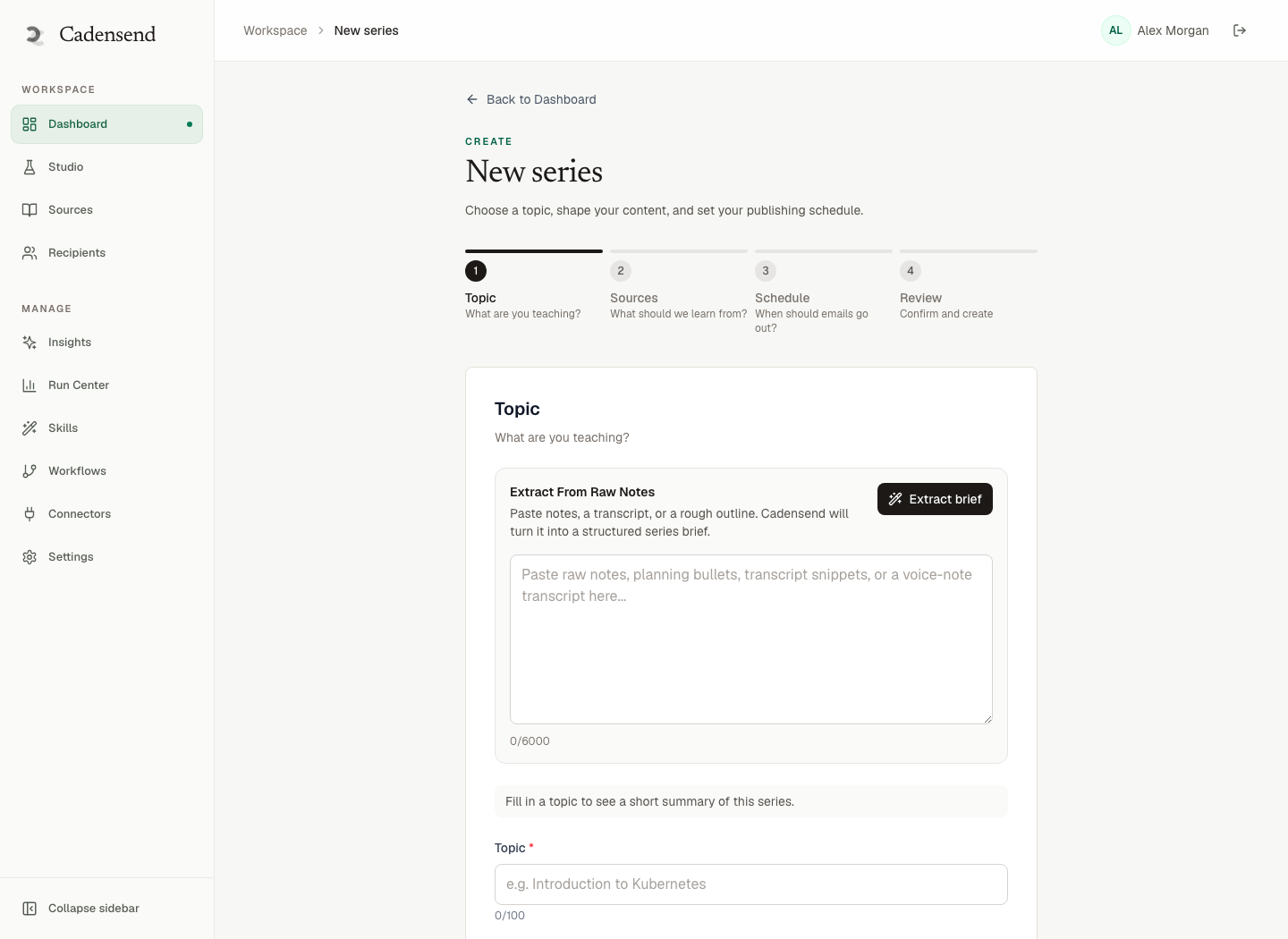
Cadensend’s Plan stage asks for topic, included and excluded concepts, outcome, audience, cadence, timezone, and tone up front. That wizard is not product chrome. It is the brief you should write even if you never generate a word with a model. Exclusions matter as much as inclusions: “no ORMs in week one” is a curriculum decision, not a prompt flourish.
If the outcome is fuzzy, stop. Do not generate 21 subjects and hope a theme appears. Talk to HinterBuild or book a working session if you are stuck between “too small” and “secretly a bootcamp.”
Build the Three-Week Arc
Short answer: Week one installs vocabulary and one happy path; week two adds the failure modes; week three requires transfer on a slightly novel prompt.
| Week | Job | Typical issue mix | Failure if you skip it |
|---|---|---|---|
| 1 | Represent the skill | 5 teach + 1 recap + 1 rest | Learners memorize steps they cannot name |
| 2 | Stress the skill | 4 teach + 2 retrieval + 1 rest | Confidence without diagnostics |
| 3 | Transfer the skill | 3 teach + 3 mixed practice + 1 recap | They only succeed on your examples |
Prerequisite ordering is the difference between a calendar and a curriculum. You cannot teach window functions before grouping, and you cannot teach tool-calling agents before structured outputs. Cadensend validates coverage and prerequisite order on the plan, then offers a revision pass when validation fails. Do that check yourself with a two-column table: this issue assumes / this issue teaches. If day 6 assumes day 14, reorder before you write. The dedicated guide on prerequisite ordering for self-paced courses is the deeper treatment.
Audience level belongs in the arc, not as a footnote. A beginner vs intermediate email course is not “the same 21 days with harder homework.” Beginners need more worked examples and fewer optional branches. Intermediates need contrast cases and “why this fails in production.” Pick one.
Design Each Daily Issue
Short answer: One issue equals one concept, one example, one 10–15 minute task, and a pointer to tomorrow’s dependency.
Email is a hostile format for binge content. That is a feature. Microlearning vs binge learning over email is the companion argument. Issue template:
- Subject names the skill, not the vibe. “Day 4: INNER JOIN vs leftover rows” beats “Your learning journey continues.”
- Preheader states the task time. Learners decide in two seconds whether they can do this on a commute.
- Hook is the error or question the day will resolve. Lead with the bug.
- Teach in 250–400 words. If you need 1,200, you hid a second issue.
- Worked example with the same nouns you will ask them to reuse.
- Retrieval task they can complete in the reply thread or a scratch file. Retrieval practice outperforms rereading (Retrieval Practice / Agarwal & Bain).
- Cite the source section you used. If you cannot cite it, you do not understand it well enough to teach it.
- Bridge one sentence to the next issue’s prerequisite.
For code-heavy skills, keep samples short and email-safe. The layout traps are documented in code samples in email without breaking. Cadensend’s Write stage returns a validated block tree — never raw HTML, never a raster the model invented — then a deterministic renderer produces HTML and plain text. That split is how you keep pedagogy from becoming a broken <pre> in Outlook.
Space, Interleave, and Rest
Short answer: Revisit week-one ideas in week three under a new prompt; do not rest only on weekends if that clusters all retrieval on Mondays.
A 21-day map that teaches a new topic every day is a lecture series, not spaced practice. Build reappearance:
- Day 3 concept returns as a two-line diagnostic on day 9.
- Day 5 example is mutated on day 16 (same structure, new names).
- Day 21 is a mixed set, not a new chapter.
Interleaving related skills (joins then filters then joins again) beats blocked chapters for discrimination. Rest days are instructional, not lazy. Put them after dense days, not only on Saturday by habit. If your learners work a Tuesday-heavy on-call rotation, a Tuesday send is a tax, not a cadence.
Cognitive load theory is the constraint: working memory is small, so extraneous load (mystery jargon, unexplained diagrams, three new tools in one email) steals capacity from the skill (Sweller, Educational Psychologist). Cut the extra tool. Teach the skill.
Ground Lessons in Sources You Trust
Short answer: Upload the docs, RFCs, internal runbooks, and canonical tutorials you actually want cited; then refuse claims that cannot point at a chunk.
Ungrounded curriculum generators hallucinate flags, deprecated APIs, and policy that never existed. That is the same failure mode as ungrounded RAG answers; see LLM hallucination causes and fixes. Cadensend’s Ground stage is built for teaching: upload files or URLs, keep heading hierarchy, preserve code and tables, and store section anchors so a citation lands on a real location.
Retrieval is scoped to workspace and series, then diversified by source. The writer has no arbitrary network or code execution. Retrieved text is data, never instruction — the same stance as human-in-the-loop agents and RAG and LLM systems. Converting an archive? Use blog-to-email conversion, not a paste into a prompt. Ground Python on docs.python.org; ground policy on the signed PDF.
Plan, Critique, and Lock Issues
Short answer: Generate the plan, validate coverage, write issue 1, approve it, lock it, then generate the rest so a rewrite of day 18 cannot silently mutate day 1.
This is where curriculum design meets system prompt design patterns and AI agent development. Cadensend uses separate graphs for planning and issue generation: retrieve, write, spec the visual, critique, gate on quality, revise within a hard limit. A bounded agent with a revision cap is safer than an unbounded “keep going until it looks nice.”
Plan Studio lets you reorder issues, edit objectives, and lock approved issues so they survive regeneration of everything around them. Use that. The first three issues define voice and difficulty. If you leave them unlocked, a later regeneration will drift tone of voice and dump new jargon into week one.
Human approval is not ceremony. Unreviewed HTML teaches the wrong JOIN with no unsend. Cadensend’s Run Center tracks generating, awaiting review, scheduled, sending, and failed jobs — the same human-in-the-loop split: the model proposes, you accept, then delivery is allowed. Idempotent sends are keyed on workspace, issue, recipient, and issue version so a 6:59am redeploy cannot duplicate day 12.
Deliver on a Cadence You Can Keep
Short answer: Pick a local send time the learner can protect, store it as a UTC instant plus IANA zone, and never “catch up” by blasting three issues on Sunday.
Cadence is part of the learning objective. Daily 7:30 in America/Chicago is a different course than “whenever the queue drains.” Cadensend stores the UTC instant beside the original IANA timezone so DST does not silently shift the series. That is curriculum integrity.
The MVP delivers only to your verified address. Use that. Teach yourself the 21-day map before you dream of an audience. Later roadmap items cover opt-in lists, consent, and company features; they are not available as a silent bulk send today, on purpose. Cadensend is not a CRM. If you need a staff rollout without an LMS, read corporate training by email without an LMS and stay honest about the current send scope.
HinterBuild ships this as open source under MIT. You pay your LLM provider, your email provider, and your infra. The engine is free. If you want help wiring retrieval, evals, or approval UX, use contact.
A Worked 21-Day Map
Short answer: Here is a complete “SQL joins you can defend” curriculum you can copy, then swap the domain.
Outcome: Write and explain multi-table queries that keep or drop rows on purpose.
| Day | Objective | Retrieval task |
|---|---|---|
| 1 | Tables, keys, grain | Sketch orders vs order_items grain |
| 2 | SELECT / WHERE | Filter yesterday without DISTINCT cargo-cult |
| 3 | INNER JOIN | Count rows before and after |
| 4 | LEFT JOIN and nulls | Customers with zero orders |
| 5 | Recap 1–4 | Explain one dropped row |
| 6 | Rest | — |
| 7 | GROUP BY after join | Revenue by customer; watch grain |
| 8 | HAVING vs WHERE | Diagnose a wrong filter location |
| 9 | Revisit INNER vs LEFT | Same idea, new names |
| 10 | Self-join | Two aliases on paper |
| 11 | Anti-join | “In A not in B” two ways |
| 12 | Rest | — |
| 13 | Window vs GROUP BY | Rank without collapsing rows |
| 14 | EXPLAIN intuition | Name the join type |
| 15 | Mixed 3/7/10 | Three short prompts |
| 16 | Fan-out failure | Why totals exploded |
| 17 | Transfer | New nouns, same joins |
| 18 | Rest | — |
| 19 | Teach-back | 12-line debug checklist |
| 20 | Timed mixed quiz | 20 minutes, closed notes |
| 21 | Capstone | Query plus row-count defense |
Notice what is missing: no ORM, no warehouse vendor, no dbt. Those are a second 21-day map. The Python beginner email analogue uses the same spine with syntax instead of joins.
Frequently Asked Questions
Is 21 days enough to learn a real skill?
Yes, if the skill is one observable performance. Twenty-one days can install a JOIN habit; it cannot replace a degree. Scope until a skeptic believes day 21.
Should every day introduce something new?
No. New-every-day maps forget quickly. Reappearance in weeks two and three is the point of a calendar.
Can I send the whole 21-day curriculum as a zip file?
You can, and most people will binge week one. Make any packet the recap, not the course.
How does Cadensend fit a 21-day skill curriculum?
You describe the goal and audience; Plan proposes modules and issues with coverage and prerequisite checks; Ground retrieves from your sources; Write produces a validated tree you can edit; Deliver sends each approved issue once. It is open source on GitHub, MIT licensed, self-hosted, with no hosted signup.
Who receives the emails in the current build?
Only your verified address. That is intentional for the MVP. Opt-in audiences, unsubscribe, and analytics are later work, gated on consent controls. Use the single-recipient loop to finish the curriculum design.
What if I need more than 21 issues?
Split into two series with an entry gate. A 42-day blob turns the prerequisite graph into spaghetti.
Do I need an LMS for this?
Not for a single skill track. You need sources, a plan, review, and reliable send. Corporate training without an LMS covers when you still need records.
How do I keep the model from inventing APIs in week two?
Ground on current docs, require structural citations, and lock approved issues. Combine that with the hallucination mitigations in our hallucination guide and editorial approval before schedule.
Conclusion
- A 21-day skill curriculum is a scoped performance with spaced retrieval, not a 21-part newsletter.
- Write the day-21 behavior first; every issue either serves it or gets cut.
- Validate prerequisites, ground in sources, lock approved issues, and treat cadence as instruction.
- Dogfood on your verified inbox before you talk about lists.
If you want a structured engine for that loop, run Cadensend locally, or talk to HinterBuild about planning, retrieval, and approval UX. The team is also on LinkedIn.
Free consultation
Book a free consultation call on skill curriculum design
30-minute call with the HinterBuild team. Discuss your project, architecture questions, or next steps — no obligation.
Book a meeting
Keep reading
Related articles
Beginner vs Intermediate Email Course Design
Design beginner vs intermediate email courses with different priors, examples, tone, and prerequisite graphs — not the same outline with harder homework.
Read post
Turn PDF Notes Into an Email Course
Turn PDF notes into an email course: ingest documents, plan modules, ground every claim, and schedule issues with real citations.
Read post
Prerequisite Ordering for Self-Paced Courses
Design prerequisite ordering for self-paced courses so email issues stay solvable, coverage is complete, and skipped dependencies cannot hide.
Read post
Microlearning vs Binge Learning in Email Courses
Compare microlearning and binge learning in email courses, and design daily issues that space practice instead of dumping a weekend archive.
Read post