
Tone of Voice for Educational Emails That Teach
Set tone of voice for educational emails so issues stay precise, kind, and on-brief — without mascot fluff or contempt for beginner mistakes.

Muhammad Abdul Sami
· 12 min read
- Tone of Voice
- Email Courses
- Instructional Design
Tone of voice for educational emails is part of the learning objective. A sarcastic aside about a “trivial” IndentationError teaches shame. A hype opener teaches the learner to skip to the code. A legal-hedged mush teaches nothing. This guide specifies a teachable tone: precise, calm, specific, and stable across 15 issues — then shows how to put that constraint in a curriculum engine instead of hoping the model “sounds helpful.”
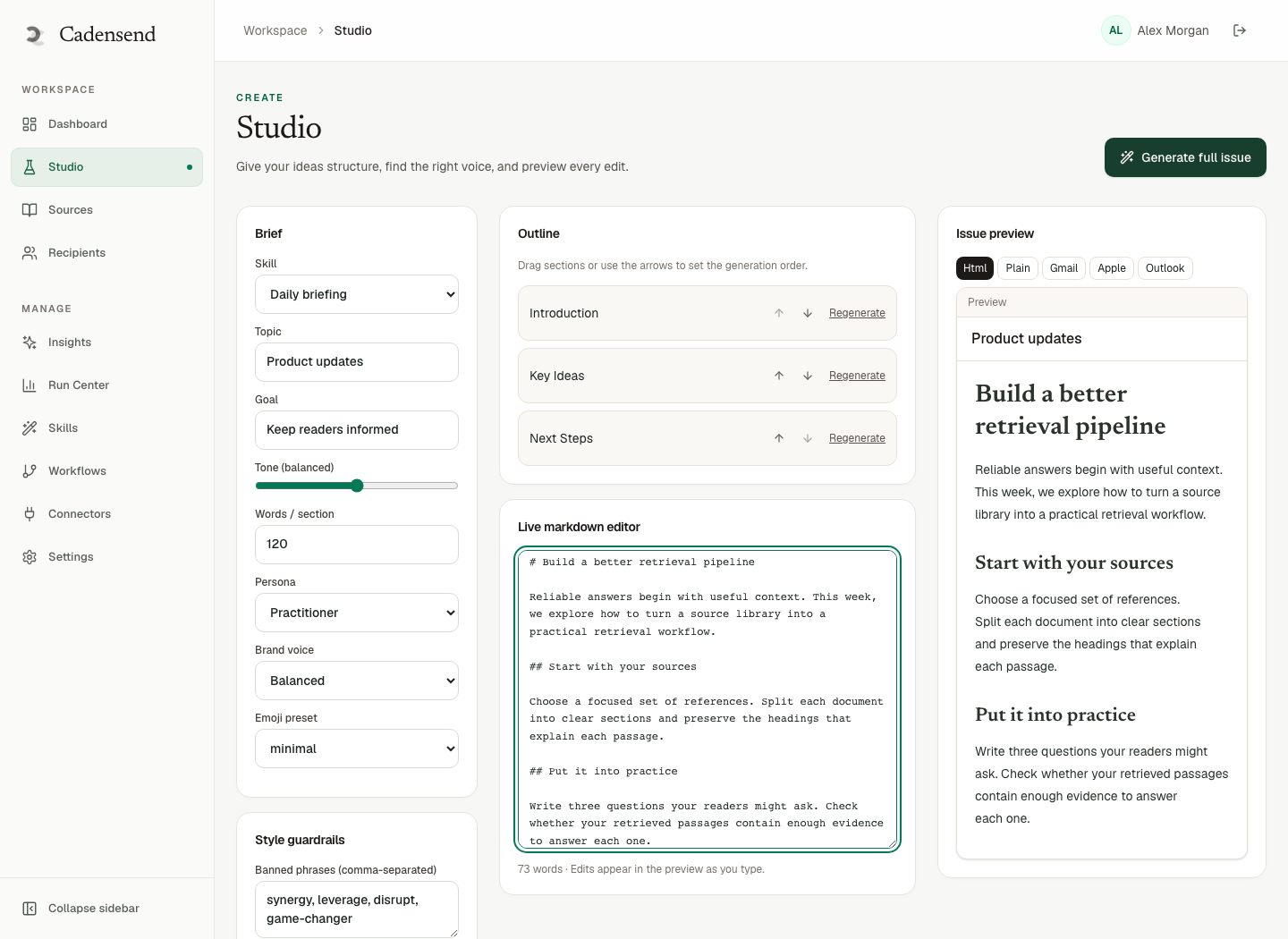
Cadensend records tone in the Create Series wizard with topic, outcome, audience, cadence, and timezone. HinterBuild’s MIT-licensed, self-hosted email curriculum engine Plans, Grounds in your sources, Writes a validated content tree, and Delivers approved issues once. No hosted signup (GitHub). MVP sends to your verified address, which is the fastest way to notice your tone sounds like a landing page.
Key Takeaways:
- Write tone as constraints (“no sarcasm about errors, no exclamation marks, define jargon once”) not as brand adjectives (“bold, playful, world-class”).
- Match tone to audience level: beginners need denotation; intermediates tolerate shorthand you defined.
- Subject and preheader are instructional, not clickbait.
- Lock issue 1 as the gold sample so regenerations cannot drift.
- Grounding keeps tone from inventing swagger around fake APIs.
- Corporate educational email is an official voice; review it like a runbook.
Table of Contents:
- Tone Is a Learning Variable
- Write Constraints, Not Vibes
- Subject Lines That Teach
- Beginner vs Intermediate Voice
- Humor, Encouragement, and Shame
- Corporate and Compliance Voice
- Prompts, Plans, and Locks
- Grounding Keeps Tone Honest
- A Tone Spec You Can Paste
- Envelope, Signature, and Review Checklist
- Frequently Asked Questions
Tone Is a Learning Variable
Short answer: Tone changes cognitive load and whether someone attempts the retrieval task.
Encouragement that says “you got this!!” without a clearer sample adds characters and no information. Contempt (“as anyone knows”) adds threat. Threat spends working memory (Sweller on load). Educational email already competes with the rest of the inbox.
Multimedia principles still apply when your “visual” is a code block: be coherent, do not decorate (Mayer, multimedia learning). Animated mascots in HTML email are not pedagogy; they are clientside risk.
Cadensend is a curriculum engine, not a marketing suite. If your tone sheet was written for a launch newsletter, rewrite it for teaching before you generate issue 1.
Write Constraints, Not Vibes
Short answer: Adjectives are not enforceable. Forbidden moves are.
Bad tone brief: “Friendly, expert, a bit witty, human.”
Good tone brief:
- Second person (“you”) for tasks; first person plural only for “we will send.”
- No “just,” “simply,” “obviously,” “easy.”
- No humor about outages, identity, or intelligence.
- Jargon: first use gets a five-word gloss; later uses may be bare.
- Max one metaphor per issue, and never mixed.
- Claims need a citation or a hedge that names the uncertainty.
That list can sit in Cadensend’s tone field and in the writer system prompt. It also belongs next to learning objectives: tone is a condition of performance (“explain without blaming the reader”).
| Vibe word | Enforceable replacement |
|---|---|
| Friendly | No insults; greetings optional; names the time-box |
| Expert | Cite sources; no fake certainty |
| Witty | Zero sarcasm; zero puns on errors |
| Bold | Specific verbs in subjects |
| Human | Admits when a sample is simplified |
Subject Lines That Teach
Short answer: The subject is the objective in miniature. The preheader is the time-box and the task type.
Patterns that work:
Day 4: INNER JOIN vs leftover rowsPython: KeyError means the name is missingIncident mail: write “what we don’t know”
Patterns that burn trust:
You won’t believe this JOIN trickYour learning journey continues ✨Quick win(usually neither)
Clickbait is binge energy in the inbox. It fights microlearning. Cadensend’s Content Studio lets you edit subject and preheader independently of the body — use that after generate, do not trust the first slogan.
For a 21-day curriculum, number the days so the graph is visible. For blog-to-course conversions, do not reuse the SEO title if it was written to rank, not to teach.
Beginner vs Intermediate Voice
Short answer: Same respect, different compression.
Beginners (Python via email): narrate the sample in the same order the interpreter will. Do not skip “this line names the list.” Intermediates: jump to the decision, but do not pretend they know an unlisted prior — prerequisite ordering still applies.
Never use “as you already know” unless it is in the audience priors. That phrase is how mixed-audience courses humiliate beginners and annoy intermediates.
Cadensend audience + tone fields should be set together. Regenerating a beginner series with an intermediate gold sample will “improve” the voice into a conference talk.
Humor, Encouragement, and Shame
Short answer: The only safe joke is about the author’s past mistake, not the reader’s present one.
Allowed: “I shipped this fan-out to production in 2022. Here is the row count that caught it.”
Disallowed: “If you still use DISTINCT to hide duplicates, please stop.”
Encouragement that works is informational: “This task should take eight minutes in the REPL. If it takes 20, the sample likely wrapped in your mail client — use the plain-text part.” That sentence also points at code in email.
Shame kills retrieval. People skip the task and wait for tomorrow’s issue, which assumes today’s. The graph breaks silently.
Corporate and Compliance Voice
Short answer: Training email is on-the-record. Write it like a runbook that a lawyer might read aloud.
Corporate training without an LMS still leaves the company logo on the From: line. Ban:
- Jokes about incidents, customers, or regulators.
- Fake legal conclusions (“this means we are not liable”).
- Emoji in severity names.
Ground on the signed policy PDF via Cadensend Ground so the voice cannot wander into last year’s deck. Human review is mandatory (approval gates). Official voice is not optional UX.
CAN-SPAM is about commercial mail (FTC), but “we’ll just BCC the department” is still a consent and credibility problem. Cadensend’s MVP will not do that anyway: verified address only.
Prompts, Plans, and Locks
Short answer: Tone in the brief → plan uses it → writer constrained → issue 1 locked → later issues clone the sample.
Cadensend Plan is a LangGraph planner with coverage and prerequisite validation. Write is a separate bounded graph: retrieve, write, spec visual, critique, gate, revise with a cap. That is agentic workflow structure, not an unconstrained chat persona.
Plan Studio locks approved issues. Lock the gold-sample issue or week three will discover a new brand voice. Content Studio diffs help you see tone drift in adjectives.
If you custom-build a writer, AI agent development should keep revision limits. Few-shot your actual issue 1 rather than “write like a teacher.”
Grounding Keeps Tone Honest
Short answer: Ungrounded swagger is how educational email becomes confidently wrong.
A breezy tone plus a hallucinated flag is worse than a dry tone plus a cited flag. Dry can still be kind. See LLM hallucinations. Cadensend citations are structural: model returns source/chunk IDs; renderer builds links. Retrieved content is data, never instruction — important when sources include snarky blog asides you do not want imitated.
Scope sources per series (RAG systems). If you index a witty marketing post, the writer will learn the wrong jokes. Backend: no arbitrary network or code execution for the writer.
Deliver should not double-send a tone-fixed revision as a second copy. Idempotency keys on workspace, issue, recipient, version; record before provider; Postgres skip-locked queue. HinterBuild (about) built boring delivery on purpose. Contact if you need that pipeline designed in-house.
A Tone Spec You Can Paste
Short answer: Copy into Cadensend’s tone field and into your review checklist.
Voice: calm senior engineer teaching one skill.
Pronouns: you for the learner; we only for the sending system.
Ban: obviously, just, simply, easy, crazy, insane, magic, journey, unlock, 🚀.
Ban: jokes about the reader, identity, incidents, intelligence.
Subjects: skill + distinction; no clickbait.
Preheader: minutes + task type (REPL / write / classify).
Errors: describe the mechanism; never the person.
Jargon: gloss on first use.
Claims: cite a source section or mark as convention.
Humor: only author’s past production mistake, once per 5 issues max.
Pair with audience priors and exclusions. For Python beginners, add “never joke about indentation.” For intermediates, add “no restating what a list is.”
Read the gold sample aloud. If you would not say it to a tired on-call, rewrite.
Envelope, Signature, and Review Checklist
Short answer: Tone does not start at the first H2 of the body. From-name, preview text, and sign-off teach before the lesson does.
From-name: “SQL joins — HinterBuild” beats “Newsletter” and beats a person’s first name if the series is official training. A joke From-name trains people to filter you. Cadensend delivers through your email provider; set the identity there. The engine is not a bulk ESP with a cute alias marketplace.
Preview / preheader: Restate minutes and task type. If it duplicates the subject with synonyms, you wasted the only extra line most clients show. Do not put “view in browser” first.
Sign-off: One line. “Issue 4 of 12. Tomorrow: LEFT JOIN nulls.” That is a prerequisite bridge, not “Cheers!!” Marketing sign-offs leak into teaching series when you convert a blog and keep the old footer. Strip CTAs that sell. HinterBuild’s contact link belongs in your authoring workflow, not in every learner issue unless the series is about hiring HinterBuild — it should not be.
Translation: If you later localize, translate constraints, not vibes. “Playful” does not survive languages. “No sarcasm about errors” does. Cadensend’s later multilingual issues are a roadmap item; the MVP is one language you actually review. Do not auto-translate locked gold samples without a native reviewer.
Review checklist (reject the issue if any box fails):
| Check | Fail example |
|---|---|
| Subject names the skill | “Level up today” |
| No banned words | “just run this” |
| Error described as mechanism | “you forgot a colon, silly” |
| Jargon glossed once | idempotent with no gloss on first use |
| Claims cited or hedged | “always use X” with no source |
| Matches audience priors | Beginner issue uses asyncio |
| Plain-text twin exists | HTML-only code |
| Time-box honest | “3 min” for a 20 min lab |
Run this in Content Studio before Deliver. Lock after pass. A later regeneration that reintroduces emoji is a failed lock, not a model mystery. Pair with code-in-email checks when samples exist.
For 21-day series, review issues 1–3 as a set. Tone drift is obvious across three days and invisible inside a single draft.
Frequently Asked Questions
Can educational email have a strong brand voice?
Yes, if the brand constraints are listed as bans and required moves. Logo-first voice without teaching constraints becomes a newsletter.
Should every issue open with a story?
No. Stories cost load. Use a hook that is the error or decision, not a childhood anecdote.
How do I stop the model from adding emoji?
Ban them in tone and in the writer schema if needed. Reject in review. Do not “clean up later” after 12 issues have shipped to your inbox.
Does Cadensend send in my brand’s marketing voice by default?
It uses the tone you enter. There is no hosted brand kit in the MVP (brand kits are a later technical-educator update). You still review HTML.
Who hears this tone today?
You, on the verified address. That is the point of dogfooding voice.
What if SMEs write in slidese?
Translate in Write, do not preserve slidese. Lock the translated gold sample. Keep SME sources for Ground, not as the voice.
Is plain language the same as beginner tone?
Plain language is for everyone. Beginner tone additionally slows the introduction of terms. Intermediates still benefit from plainness. If a sentence would survive a translation test — the constraint remains true in another language — it is probably plain enough. If it depends on an English pun, it is decoration. Put the surviving constraints in Cadensend’s tone field and lock issue 1 so a later Write pass cannot reintroduce puns, emoji, or “just.”
How do I review tone without a brand team?
Read the issue aloud, then paste the body into a list of banned words. Fail the issue if any hit. HinterBuild’s about page is engineering-first on purpose: we would rather a dry, cited lesson than a mascot. The same standard belongs in educational email, including series you dogfood on a verified address before anyone else sees them.
Conclusion
- Educational email tone is a constraint list that protects load, dignity, and truth.
- Put tone in the series brief, the writer rules, and the locked gold sample.
- Ground claims; review official voice; never clickbait a lesson.
- Run the loop in Cadensend: Plan, Ground, Write, Deliver.
Free consultation
Book a free consultation call on educational email tone
30-minute call with the HinterBuild team. Discuss your project, architecture questions, or next steps — no obligation.
Book a meeting
Keep reading
Related articles
Cite Sources in Educational Emails Correctly
Cite sources in educational emails without fake footnotes: structural citations, retrieval grounding, and a reviewer checklist that catches invented refs.
Read post
Transactional vs Educational Email Types
Transactional vs educational email differ in trigger, consent, and retries. Cadensend is a curriculum engine, not a receipt sender.
Read post
Teach With Sources, Not AI Vibes in Email
Teach with sources, not AI vibes: ground every educational email in files you supply, with citations the model cannot fabricate.
Read post
Teach Python to Beginners Through Email Courses
Teach Python to beginners with a source-grounded email course: small syntax loops, safe code samples, prerequisites, and a cadence they can finish.
Read post